Loading
Form preview
  • US Legal Forms
  • Form Library
  • More Forms
  • More Uncategorized Forms
  • Transcript Request Form.indd - Oklahoma City University - Okcu

Get Transcript Request Form.indd - Oklahoma City University - Okcu

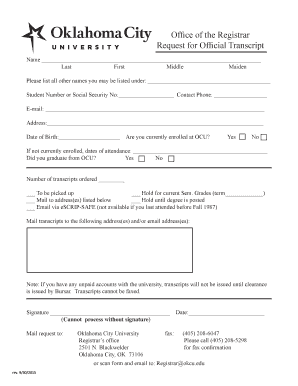
Ofce of the Registrar Request for Ofcial Transcript Name Last First Middle Maiden Please list all other names you may be listed under: Student Number or Social Security No: Contact Phone: Email: Address:.

How it works

  1. Open form

    Open form follow the instructions

  2. Easily sign form

    Easily sign the form with your finger

  3. Share form

    Send filled & signed form or save

How to fill out the Transcript Request Form.indd - Oklahoma City University - Okcu online

Filling out the Transcript Request Form is an essential process for obtaining your official academic transcripts from Oklahoma City University. This guide will take you through each section of the form, ensuring a smooth and efficient submission.

Follow the steps to fill out the Transcript Request Form online.

  1. Click the ‘Get Form’ button to access the Transcript Request Form. This will open the document in your preferred editing tool.
  2. Begin by filling in your personal information. Enter your last name, first name, middle name, and maiden name, if applicable. Ensure all names are spelled correctly, as they will appear on your transcript.
  3. List any other names you may be known by. This helps the university locate your records more easily.
  4. Provide your student number or Social Security number, along with your contact phone number and email address. This information is crucial for the processing of your request.
  5. Input your current address, making sure to include all relevant details so the transcripts can be mailed correctly.
  6. Fill in your date of birth. Confirm whether you are currently enrolled at OCU by selecting ‘Yes’ or ‘No.’ If not enrolled, indicate your dates of attendance.
  7. Indicate whether you graduated from OCU by selecting ‘Yes’ or ‘No.’
  8. Specify the number of transcripts you wish to order. Next, select your delivery preference, such as pickup, mailing, or holding the transcripts until certain conditions are met.
  9. Provide the address or email address where you would like the transcripts sent. Ensure accuracy to avoid delays.
  10. Sign the form. Note that the request cannot be processed without your signature.
  11. Finally, indicate the date of your request. Ensure all information is complete before submitting.
  12. Save any changes made to the form. You may then download, print, or share the form as needed.

Complete your transcript request form online today for a hassle-free experience!

Get form

Experience a faster way to fill out and sign forms on the web. Access the most extensive library of templates available.
Get form

Related content

08 Preface Final.indd - Cook County Open Docs
Jul 7, 2008 — In order to receive this award, a governmental unit must publish a budget...
Learn more
Transcript Request Form.indd - Oklahoma City...
Jun 4, 2018 — Did you graduate from OCU? Yes. No. Number of transcripts ordered ______...
Learn more

Related links form

MOS GB FIGHTER 1220 031070 - NIBE Consulado General De M Xico En San Diego - Secretar A De ... INVITATION FOR QUOTATION TEQIPII/2013/KL1G18/54 31Oct2013 To, Sub: Invitation For Quotations For NEWCASTLE UNITED FOOTBALL COMPANY LTD - Staff Application Form

Questions & Answers

Get answers to your most pressing questions about US Legal Forms API.

Contact support

Official transcripts 2501 North Blackwelder Ave, Oklahoma City, OK 73106.

Unofficial Transcripts: Current students can access and print unofficial copies of their academic work by logging on to their myOKSTATE Self-Service account and selecting Student Records, then Unofficial Transcript.

In order for a student to access transcripts through ONE, they will need to log in to Single-Sign On at one.ou.edu: Under the Academics tab, click Academic Profile. To access an unofficial transcript, click “View unofficial transcript”. ... To access an official transcript, click “Request official transcript”.

If the student submitted the OU Application, the counselor should submit documents via their school's electronic transcript provider (Parchment, Xap, Scoir, etc.) or through Slate.org. Additionally, they can mail the documents to us or send them directly to oardocuments@ou.edu.

Electronic transcript orders will be processed within 3-5 business days. Mailed paper transcript orders will be processed within 3-5 business days. The default shipping method is USPS, but an expedited option via FedEx is available with additional shipping charges.

If the student submitted the OU Application, the counselor should submit documents via their school's electronic transcript provider (Parchment, Xap, Scoir, etc.) or through Slate.org. Additionally, they can mail the documents to us or send them directly to oardocuments@ou.edu.

REQUESTING TRANSCRIPTS To order official transcript(s) in PDF format or printed, log in to Parchment. The site will walk you through placing your order, including delivery options and fees. ... You will be notified if you have a transcript hold. PDF transcripts are sent the same day they are ordered.

To obtain a transcript from a California public school, you will need to contact the school directly. If the school is closed, we suggest contacting the local school district or the County Office of Education for assistance.

Get This Form Now!

Use professional pre-built templates to fill in and sign documents online faster. Get access to thousands of forms.
Get form
If you believe that this page should be taken down, please follow our DMCA take down processhere.
Get Transcript Request Form.indd - Oklahoma City University - Okcu
Get form
  • Adoption
  • Bankruptcy
  • Contractors
  • Divorce
  • Home Sales
  • Employment
  • Identity Theft
  • Incorporation
  • Landlord Tenant
  • Living Trust
  • Name Change
  • Personal Planning
  • Small Business
  • Wills & Estates
  • Packages A-Z
  • Affidavits
  • Bankruptcy
  • Bill of Sale
  • Corporate - LLC
  • Divorce
  • Employment
  • Identity Theft
  • Internet Technology
  • Landlord Tenant
  • Living Wills
  • Name Change
  • Power of Attorney
  • Real Estate
  • Small Estates
  • Wills
  • All Forms
  • Forms A-Z
  • Form Library
  • Legal Hub
  • About Us
  • Help Portal
  • Legal Resources
  • Blog
  • Affiliates
  • Contact Us
  • Delete My Account
  • Site Map
  • Industries
  • Forms in Spanish
  • Localized Forms
  • State-specific Forms
  • Forms Kit
  • Real Estate Handbook
  • All Guides
  • Notarize
  • Incorporation services
  • For Consumers
  • For Small Business
  • For Attorneys
  • USLegal
  • FormsPass
  • pdfFiller
  • signNow
  • altaFlow
  • DocHub
  • Instapage
Form Packages
  • Adoption
  • Bankruptcy
  • Contractors
  • Divorce
  • Home Sales
  • Employment
  • Identity Theft
  • Incorporation
  • Landlord Tenant
  • Living Trust
  • Name Change
  • Personal Planning
  • Small Business
  • Wills & Estates
  • Packages A-Z
Form Categories
  • Affidavits
  • Bankruptcy
  • Bill of Sale
  • Corporate - LLC
  • Divorce
  • Employment
  • Identity Theft
  • Internet Technology
  • Landlord Tenant
  • Living Wills
  • Name Change
  • Power of Attorney
  • Real Estate
  • Small Estates
  • Wills
  • All Forms
  • Forms A-Z
  • Form Library
Customer Service
  • Legal Hub
  • About Us
  • Help Portal
  • Legal Resources
  • Blog
  • Affiliates
  • Contact Us
  • Delete My Account
  • Site Map
  • Industries
  • Forms in Spanish
  • Localized Forms
  • State-specific Forms
  • Forms Kit
Legal Guides
  • Real Estate Handbook
  • All Guides
Prepared for you
  • Notarize
  • Incorporation services
Our Customers
  • For Consumers
  • For Small Business
  • For Attorneys
Our Sites
  • USLegal
  • FormsPass
  • pdfFiller
  • signNow
  • altaFlow
  • DocHub
  • Instapage
Social Media
Call us now toll free:
+1 833 426 79 33
As seen in:
© Copyright 1999-2026 airSlate Legal Forms, Inc. 17 Station Street, Suite 303, Brookline, MA 02445
  • Your Privacy Choices
  • Terms of Service
  • Privacy Notice
  • Content Takedown Policy
  • Bug Bounty Program