Loading
Form preview
  • US Legal Forms
  • Other Templates
  • More Forms
  • More Uncategorized Forms
  • Wex Rapid! Paycard Consent Form - Cinemark

Get Wex Rapid! Paycard Consent Form - Cinemark

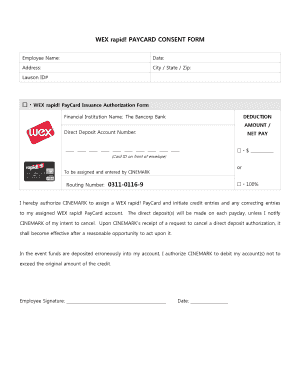
WEX rapid! PAYCARD CONSENT FORM Employee Name: Date: Address: City / State / Zip: Lawson ID# WEX rapid! PayCard Issuance Authorization Form Financial Institution Name: The Bancorp Bank DEDUCTION AMOUNT.

How it works

  1. Open form

    Open form follow the instructions

  2. Easily sign form

    Easily sign the form with your finger

  3. Share form

    Send filled & signed form or save

How to fill out the WEX Rapid! PAYCARD CONSENT FORM - Cinemark online

This guide provides clear and comprehensive instructions for completing the WEX Rapid! PAYCARD CONSENT FORM for Cinemark. Following these steps will ensure that your form is filled out accurately and submitted efficiently.

Follow the steps to complete your WEX Rapid! PAYCARD consent form.

  1. Click ‘Get Form’ button to access the WEX Rapid! PAYCARD Consent Form.
  2. Begin by entering your full name in the 'Employee Name' field. This should be your legal name as it appears on your official documents.
  3. Next, fill in the 'Date' field with the current date to indicate when you are completing the form.
  4. Provide your complete address, including 'Address', 'City', 'State', and 'Zip Code' in their respective fields.
  5. Enter your Lawson ID# in the designated field to identify your employee account.
  6. In the section labeled 'Deduction Amount', specify the dollar amount you wish to have deducted for your PayCard. You can indicate this amount under the ‘$ ___________’ section.
  7. Next, locate the 'Direct Deposit Account Number' field. Here, enter the account number that you will be using for direct deposits.
  8. Fill in the 'Routing Number' as '0311-0116-9' to connect your account correctly for the direct deposit.
  9. Read the authorization statement carefully. By checking the box, you authorize Cinemark to assign a WEX Rapid! PayCard, initiate credit entries, and make necessary corrections.
  10. Ensure that you understand the terms regarding the cancellation of direct deposits, as stated in the form.
  11. Lastly, in the 'Employee Signature' section, sign your name and enter today's date to validate your consent.
  12. After completing all fields, save your changes, and proceed to download, print, or share the form as required.

Complete your WEX Rapid! PAYCARD CONSENT FORM online today!

Get form

Experience a faster way to fill out and sign forms on the web. Access the most extensive library of templates available.
Get form

Related content

485BPOS 1
Part C has also been updated pursuant to the requirements of Form N-3. ... The Funds also...
Learn more
Charlotte sun herald ( 04-03-2018 ) - UF Digital...
Permission granted to University of Florida to digitize and display this item for...
Learn more

Related links form

Role Of Political Parties In Pakistan And Perverted Form Letter Of Intent (LOI) Guidelines Windsor Dual Jd Supplemental Form Busitema University Online Application

Questions & Answers

Get answers to your most pressing questions about US Legal Forms API.

Contact support

Getting Cash from an ATM Insert your card into the machine and enter your PIN when prompted. Select Checking and the amount you want to withdraw. Accept the fee when asked. Take your cash and your card.

Green Dot Corporation, along with its wholly owned subsidiary bank, Green Dot Bank, provides rapid! the size, scale and unique ability to allow us to further enhance efficiencies where other financial institutions simply can't.

According to the list of supported cards for Cash App, most government-enabled prepaid cards are accepted, but not for deposits, as well as all debit and credit cards from Visa, MasterCard, American Express, and Discover.

Some bank issuers may take up to 48 hours to post funds to your card account. Fees may apply. While rapid! PayCard does not charge for this feature and service, standard text messaging, data and cellular rates may apply.

You currently can't use a prepaid card on Cash App to add funds to your account. Cash App accepts linked bank accounts and credit or debit cards backed by Visa, American Express, Discover, or MasterCard.

Transferring money from your payroll card to a bank account can be simple or complicated, depending on which payroll card provider you choose. ... If your employer offers you a payroll card, it must offer you either a direct deposit or paper check option as well.

When you call Customer Support 1.877. 380.0980 to activate your card you may also request an upgrade to a personalized card with your name embossed on it at no additional cost. When the personalized rapid!

Temporarily hold or ban credit cards. Entering wrong card details like incorrect card number, CVV and expiration date. Using a deactivated and expired card could also be a reason. Cash App does not support any card which is not supported by the USA bank.

How do I link my unemployment prepaid debit card? Tap the Banking tab on the bottom left of your Cash App home screen, then press Add Cash. Follow the prompts to link your card.

Get This Form Now!

Use professional pre-built templates to fill in and sign documents online faster. Get access to thousands of forms.
Get form
If you believe that this page should be taken down, please follow our DMCA take down processhere.
Get WEX Rapid! PAYCARD CONSENT FORM - Cinemark
Get form
  • Adoption
  • Bankruptcy
  • Contractors
  • Divorce
  • Home Sales
  • Employment
  • Identity Theft
  • Incorporation
  • Landlord Tenant
  • Living Trust
  • Name Change
  • Personal Planning
  • Small Business
  • Wills & Estates
  • Packages A-Z
  • Affidavits
  • Bankruptcy
  • Bill of Sale
  • Corporate - LLC
  • Divorce
  • Employment
  • Identity Theft
  • Internet Technology
  • Landlord Tenant
  • Living Wills
  • Name Change
  • Power of Attorney
  • Real Estate
  • Small Estates
  • Wills
  • All Forms
  • Forms A-Z
  • Other Templates
  • Legal Hub
  • About Us
  • Help Portal
  • Legal Resources
  • Blog
  • Affiliates
  • Contact Us
  • Delete My Account
  • Site Map
  • Industries
  • Forms in Spanish
  • Localized Forms
  • State-specific Forms
  • Forms Kit
  • Real Estate Handbook
  • All Guides
  • Notarize
  • Incorporation services
  • For Consumers
  • For Small Business
  • For Attorneys
  • USLegal
  • FormsPass
  • pdfFiller
  • signNow
  • altaFlow
  • DocHub
  • Instapage
Form Packages
  • Adoption
  • Bankruptcy
  • Contractors
  • Divorce
  • Home Sales
  • Employment
  • Identity Theft
  • Incorporation
  • Landlord Tenant
  • Living Trust
  • Name Change
  • Personal Planning
  • Small Business
  • Wills & Estates
  • Packages A-Z
Form Categories
  • Affidavits
  • Bankruptcy
  • Bill of Sale
  • Corporate - LLC
  • Divorce
  • Employment
  • Identity Theft
  • Internet Technology
  • Landlord Tenant
  • Living Wills
  • Name Change
  • Power of Attorney
  • Real Estate
  • Small Estates
  • Wills
  • All Forms
  • Forms A-Z
  • Other Templates
Customer Service
  • Legal Hub
  • About Us
  • Help Portal
  • Legal Resources
  • Blog
  • Affiliates
  • Contact Us
  • Delete My Account
  • Site Map
  • Industries
  • Forms in Spanish
  • Localized Forms
  • State-specific Forms
  • Forms Kit
Legal Guides
  • Real Estate Handbook
  • All Guides
Prepared for you
  • Notarize
  • Incorporation services
Our Customers
  • For Consumers
  • For Small Business
  • For Attorneys
Our Sites
  • USLegal
  • FormsPass
  • pdfFiller
  • signNow
  • altaFlow
  • DocHub
  • Instapage
Social Media
Call us now toll free:
+1 833 426 79 33
As seen in:
© Copyright 1999-2026 airSlate Legal Forms, Inc. 17 Station Street, Suite 303, Brookline, MA 02445
  • Your Privacy Choices
  • Terms of Service
  • Privacy Notice
  • Content Takedown Policy
  • Bug Bounty Program