Loading
Get Electronic Product Fulfillment Web Access Request Form - Usps.com
How it works
-

Open form follow the instructions
-

Easily sign the form with your finger
-

Send filled & signed form or save
How to fill out the Electronic Product Fulfillment Web Access Request Form - USPS.com online
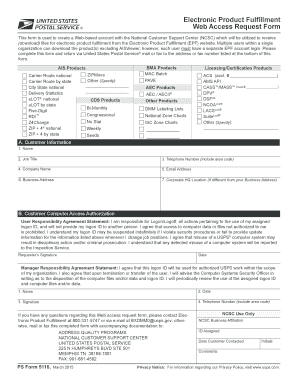
Filling out the Electronic Product Fulfillment Web Access Request Form is essential for individuals who wish to establish a web-based account with the National Customer Support Center. This guide offers a step-by-step approach to ensure that users can complete the form accurately and efficiently.
Follow the steps to successfully complete the electronic product fulfillment request form.
- Click the ‘Get Form’ button to obtain the form and open it in your preferred editing tool.
- Provide your customer information in section A. Enter your full name, job title, telephone number with area code, company name, email address, business address, and corporate headquarters location if it is different from your business address.
- Complete section B, which is the Customer Computer Access Authorization. Read the User Responsibility Agreement Statement carefully and ensure you understand your obligations regarding logon usage and data access. Sign and date the form to confirm your agreement.
- Additionally, the manager must fill out the Manager Responsibility Agreement Statement. They should include their name, date, signature, and telephone number, confirming the authorized use of the logon ID.
- Select the types of products you wish to access by checking the appropriate boxes provided in the product sections. Specify any other products as necessary.
- Review the completed form thoroughly for accuracy. Ensure all fields are filled out correctly, as incomplete forms may delay processing.
- Finally, save your changes, download the completed form, and opt to print or share it as needed. Submit the form via USPS mail or fax to the specified address or number listed at the bottom of the form.
Complete your request form online today to ensure timely access to electronic products through USPS.
We set the position of the footer element to fixed to keep it in a fixed position on the page. We set the bottom property of the footer element to 0 to ensure that it is positioned at the bottom of the screen. We set the width of the footer element to 100% to ensure that it spans the entire width of the screen.
Industry-leading security and compliance
US Legal Forms protects your data by complying with industry-specific security standards.
-
In businnes since 199725+ years providing professional legal documents.
-
Accredited businessGuarantees that a business meets BBB accreditation standards in the US and Canada.
-
Secured by BraintreeValidated Level 1 PCI DSS compliant payment gateway that accepts most major credit and debit card brands from across the globe.