Loading
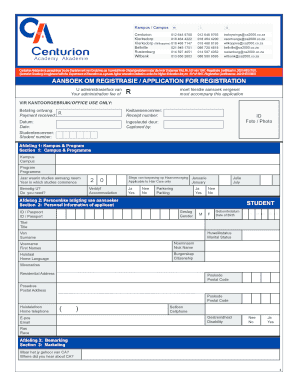
Get Inskrywingsca2000coza Form
How it works
-

Open form follow the instructions
-

Easily sign the form with your finger
-

Send filled & signed form or save
How to fill out the Inskrywingsca2000coza Form online
This guide provides comprehensive instructions on how to complete the Inskrywingsca2000coza Form online. Whether you are familiar with digital forms or new to the process, this step-by-step guide will help you navigate each section efficiently and accurately.
Follow the steps to successfully complete the Inskrywingsca2000coza Form.
- Press the ‘Get Form’ button to access the Inskrywingsca2000coza Form and open it in the online editor.
- In Section 1 (Campus & Programme), select your desired campus and program. Indicate the year your studies will commence and specify if you need accommodation or parking.
- In Section 2 (Personal Information of applicant), provide the applicant’s details including gender, identification number, date of birth, name, home language, citizenship, and both residential and postal addresses. Ensure to include contact numbers and email addresses.
- In Section 3 (Marketing), indicate where you heard about Centurion Academy.
- In Section 4 (Details regarding school education), list the name of your school, the year you completed Grade 12, and any relevant subjects and marks.
- In Section 5 (Next of kin), complete the information for the person in case of emergencies, including their contact details and relation to you.
- In Section 6 (Information of person responsible for payment of fees), provide the details for the person covering the costs, including their identification and contact information.
- In Section 7 (Payment Options), indicate your preferred payment method and complete necessary documentation if you are opting for an installment plan.
- Read and agree to the declarations in Sections 8 (Declaration by person responsible for payment of programme fees) and 9 (Declaration by student) confirming the provided information is accurate and you understand your commitments.
- In Section 10 (Indemnity Form & Medical information), consent to the terms regarding safety and indicate any medical conditions, completing the contact details for an emergency contact.
- Finally, review all sections for completeness, make any necessary edits, and then save your changes. You can choose to download, print, or share the completed Inskrywingsca2000coza Form as required.
Complete your documents online today!
When shooting in log, colors look less saturated, so it's necessary to 'color grade' in post-production to get the colors back. Videographers still choose to shot in log so they can retain information in the shadows and highlights, as color can easily be replicated after.