Loading
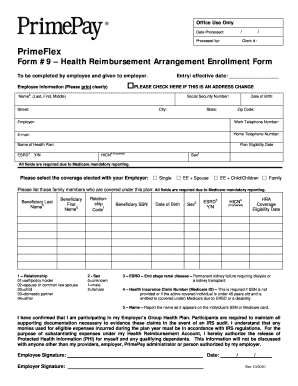
Get Primeflex - Form #9 - Hra Enrollment Form Msp
How it works
-

Open form follow the instructions
-

Easily sign the form with your finger
-

Send filled & signed form or save
How to fill out the PrimeFlex - Form #9 - HRA Enrollment Form MSP online
The PrimeFlex - Form #9 - HRA Enrollment Form is essential for enrolling in your employer’s health reimbursement arrangement. This guide will provide step-by-step instructions to help you complete the form online thoroughly and accurately.
Follow the steps to successfully complete the form online.
- Press the ‘Get Form’ button to access the PrimeFlex - Form #9 - HRA Enrollment Form and open it in your online editor.
- Begin with the header section by entering the entry/effective date in the provided space. If you are updating your address, check the box indicating an address change.
- In the Employee Information section, clearly print your name (last, first, middle), social security number, and provide your home address details including street, city, state, and zip code.
- Fill in your employer's name, work and home telephone numbers, and e-mail address. Ensure you double-check this information for accuracy.
- Specify your health plan by entering the name of the plan in the designated field.
- Indicate your plan eligibility date if covered and select your sex from the relevant options.
- Choose the coverage option you elected with your employer by marking the appropriate box (Single, EE + Spouse, EE + Child/Children, Family).
- List any family members covered under this plan in the section provided and ensure to include all required beneficiary information such as last name, first name, relationship code, sex, social security number, date of birth, and health insurance claim number if applicable.
- Acknowledge your participation in the employer’s group health plan by confirming your commitment and understanding of the documentation requirements. Complete the authorization for the release of protected health information.
- Finally, sign and date the form to confirm that all the information provided is accurate and complete.
- Once completed, save your changes, and download, print, or share the form as needed.
Complete your documentation online efficiently by following these guidelines.
Setup Module Loader. PrimeFlex is available for download at NPM for usage with a module bundler such as webpack. ... Load from CDN. PrimeFlex can also be loaded from a CDN using a link tag. ... Themes. ... Variables. ... Reuse Classes. ... Production Size. ... VSCode Extension.
Industry-leading security and compliance
US Legal Forms protects your data by complying with industry-specific security standards.
-
In businnes since 199725+ years providing professional legal documents.
-
Accredited businessGuarantees that a business meets BBB accreditation standards in the US and Canada.
-
Secured by BraintreeValidated Level 1 PCI DSS compliant payment gateway that accepts most major credit and debit card brands from across the globe.