Loading
Get Single Event Medical Release Form . Pdf - Heritage Presbyterian ...
How it works
-

Open form follow the instructions
-

Easily sign the form with your finger
-

Send filled & signed form or save
How to fill out the Single Event Medical Release Form . Pdf - Heritage Presbyterian online
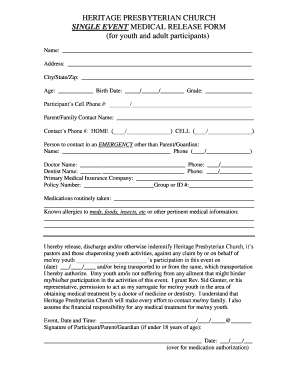
Completing the Single Event Medical Release Form is essential for participation in events organized by Heritage Presbyterian Church. This guide provides clear instructions on how to fill out the form accurately to ensure a smooth process.
Follow the steps to expertly complete the form online.
- Click ‘Get Form’ button to obtain the form and open it in the editor.
- Fill in the participant's name in the designated field at the top. Ensure that the spelling is accurate to avoid issues.
- Provide the complete address, including city, state, and zip code. This information can be crucial in case of emergencies.
- Indicate the age and birth date of the participant. These details help verify eligibility and assist in emergency situations.
- Include the participant’s cell phone number. This allows for easy communication if needed.
- Enter the name and phone number of a parent or family contact, ensuring they can be reached in emergencies.
- List an emergency contact other than the parent or guardian. Provide their name and phone number for immediate communication during an event.
- Fill in the names and phone numbers of the participant's doctor and dentist. This information is useful should any medical needs arise.
- Specify the primary medical insurance company, policy number, and group or ID number to ensure coverage during events.
- Document any medications routinely taken by the participant, as well as any known allergies or other pertinent medical information.
- In the release statement, affirm that the participant is fit to participate and authorize necessary medical treatment. Ensure you include the date of the event.
- Finally, have the participant or their parent/guardian sign and date the form, ensuring that it is completed before submission.
- Once all fields are filled and verified, you may save changes, download, print, or share the form.
Complete your forms online today for seamless participation.