Loading
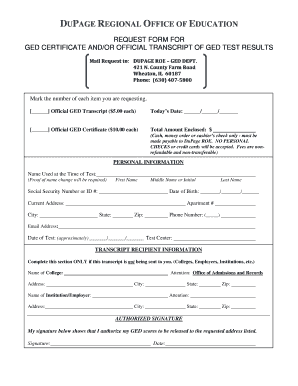
Get Ged Request Form 51315
How it works
-

Open form follow the instructions
-

Easily sign the form with your finger
-

Send filled & signed form or save
How to fill out the GED REQUEST FORM 51315 online
Filling out the GED Request Form 51315 is a straightforward process that allows you to obtain your GED certificate and/or official transcript. This guide will provide you with clear, step-by-step instructions to ensure you complete the form accurately and efficiently.
Follow the steps to fill out the GED Request Form 51315 online:
- Click the ‘Get Form’ button to access the GED Request Form 51315 and open it in your preferred editor.
- Begin by marking the number of each item you are requesting: Official GED Transcript ($5.00 each) and/or Official GED Certificate ($10.00 each). Be sure to enter the total amount enclosed, specifying that you will submit cash, money order, or cashier’s check, noting that personal checks and credit cards are not accepted.
- In the Personal Information section, enter the name you used at the time of your test, including your first name, middle name or initial, last name, and social security number or ID number. Provide your date of birth and current address, including apartment number, city, state, and zip code.
- Fill in your phone number and email address. Ensure these are current, as they will be used for communication regarding your request.
- Sign the form in the designated area and include the approximate date of your test along with the test center.
- If your transcript is being sent to someone other than yourself, complete the Transcript Recipient Information section. Fill in the name and address of the college, employer, or institution, including the attention line, city, state, and zip code.
- In the Authorized Signature section, sign your name again to authorize the release of your GED scores to the designated address.
- If there are any changes or corrections needed regarding your name, social security number, or date of birth, refer to the important information section and gather the required documentation. Ensure this is included with your request.
- Review the completed form for accuracy and completeness, then proceed to save your changes, download, print, or share the form as necessary.
Complete your GED Request Form 51315 online today to obtain your certificate or transcript.
To obtain an official copy of your diploma or transcript, please download Attachment H and submit the completed form to the New York State HSE Office. If you took the HSE/TASC Tests before 1982, your test session results may not be available thru the online HSE/TASC Status Report Service.
Industry-leading security and compliance
US Legal Forms protects your data by complying with industry-specific security standards.
-
In businnes since 199725+ years providing professional legal documents.
-
Accredited businessGuarantees that a business meets BBB accreditation standards in the US and Canada.
-
Secured by BraintreeValidated Level 1 PCI DSS compliant payment gateway that accepts most major credit and debit card brands from across the globe.