Loading
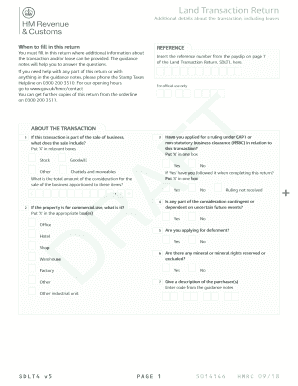
Get .(draft) Additional Details About The Transaction, Including Leases(form Sdlt4)
How it works
-

Open form follow the instructions
-

Easily sign the form with your finger
-

Send filled & signed form or save
How to fill out the .(Draft) Additional Details About The Transaction, Including Leases (Form SDLT4) online
Filling out the .(Draft) Additional Details About The Transaction, Including Leases (Form SDLT4) online is crucial for providing further information about your land transaction. This guide offers clear, step-by-step instructions to help users complete the form accurately and efficiently.
Follow the steps to fill out the form seamlessly.
- Click the 'Get Form' button to obtain the form and open it in your preferred online editor.
- Begin by inserting the reference number from the payslip found on page 7 of the Land Transaction Return, SDLT1.
- Indicate whether this transaction is part of a sale of business by marking the relevant boxes for stock, goodwill, or other items.
- If you have applied for a ruling under CAP1 or non-statutory business clearance (NSBC), select 'Yes' and verify whether you have adhered to the ruling while completing this return.
- Provide the total amount of consideration for the sale of the business as it pertains to the items above.
- Check if the property is for commercial use and mark the appropriate options, such as office, hotel, shop, warehouse, factory, or other.
- State if any part of the consideration is contingent on uncertain future events by selecting 'Yes' or 'No'.
- Determine whether you are applying for deferment and respond accordingly.
- Complete the section regarding mineral or mineral rights, stating whether any are reserved or excluded.
- Describe the purchaser(s) by entering the relevant code from the guidance notes.
- Complete the 'About Leases' section if applicable, indicating the type of property and whether a plan is attached.
- Provide the address or situation of the land, including house or building numbers.
- Fill in the type of lease and relevant dates such as the start and end date as specified in the lease.
- Specify the annual starting rent and any rent-free periods, as well as the local authority number.
- Calculate and input the total premium payable, net present value, and total amount of tax due.
- Review all filled-out information for accuracy and completeness before finalizing.
- Once completed, save your changes, download the form, print, or share it as necessary.
Complete your .(Draft) Additional Details About The Transaction, Including Leases (Form SDLT4) online today!
Typical Entities are Address, Account, CreditCard, Customer, ProductDetails, and others.