Loading
Get Donation Receipt - Bridging.org - Home
How it works
-

Open form follow the instructions
-

Easily sign the form with your finger
-

Send filled & signed form or save
How to fill out the Donation Receipt - Bridging.org - Home online
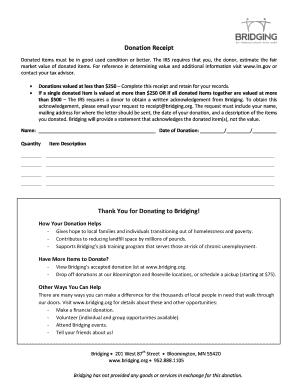
Filling out the Donation Receipt for Bridging is a straightforward process that helps document your charitable contributions. This guide will walk you through each step, ensuring you provide the necessary information accurately and efficiently.
Follow the steps to complete your donation receipt effectively.
- Click ‘Get Form’ button to obtain the Donation Receipt and open it in your preferred online form editor.
- In the 'Name' field, enter your full name as the donor. This information is essential for record-keeping and tax purposes.
- Fill in the 'Date of Donation' with the date when the donation was made. Use the format MM/DD/YYYY for clarity.
- For the 'Quantity' field, specify the number of items you are donating. Ensure this aligns with the item descriptions you will list next.
- In the 'Item Description' section, provide detailed descriptions for each donated item. Be as specific as possible to accurately document your contributions.
- If your total donation value is less than $250, retain a copy of this receipt for your records. For donations valued over $250 or more than $500, remember to request a written acknowledgment from Bridging by emailing receipt@bridging.org with your details.
- Once all fields are completed, review the information for accuracy. After confirming that everything is correct, you can save your changes, download the receipt, print it, or share it with relevant parties.
Complete your donation receipt online today and make a meaningful impact!
There is no specific charitable donations limit without a receipt, you always need some sort of proof of your donation or charitable contribution. For amounts up to $250, you can keep a receipt, cancelled check or statement. Donations of more than $250 require a written acknowledgement from the charity.