Loading
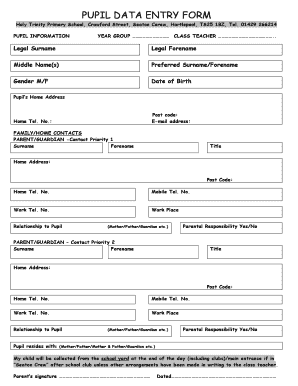
Get Pupil Data Form
How it works
-

Open form follow the instructions
-

Easily sign the form with your finger
-

Send filled & signed form or save
How to fill out the Pupil Data Form online
Filling out the Pupil Data Form online is an important step in ensuring that your child is properly registered and provided for at school. This guide will provide you with clear, step-by-step instructions to assist you in completing the form accurately and efficiently.
Follow the steps to complete the Pupil Data Form with ease.
- Click the ‘Get Form’ button to access the Pupil Data Form and open it in your preferred online editor.
- Begin by filling in the pupil information section. Enter the legal surname, forename, and any middle names as applicable. Make sure to include the preferred surname or forename if different from the legal name.
- Select the gender of the pupil by choosing 'M' for male or 'F' for female. Enter the date of birth, ensuring that it is formatted correctly.
- Provide the pupil’s home address, including the postal code and an email address. Additionally, enter the home telephone number.
- In the family/home contacts section, complete the details for the first contact (Parent/Guardian). This includes their surname, forename, title, home address, postal code, and various contact numbers (home, mobile, work). Specify their relationship to the pupil and indicate whether they have parental responsibility.
- Repeat the same process for the second contact (Parent/Guardian) as detailed in step 5.
- Indicate where the pupil resides by selecting the appropriate option (e.g., mother, father, guardian). Confirm arrangements for child pick-up at the end of the school day.
- For emergency contacts, fill in the additional contact details (Contacts 3 and 4) using the same structure as previous contacts.
- In the other information section, provide the name and contact number of the family doctor, along with their address. Specify any medical conditions and ethnic origin of the pupil, as well as home language.
- Complete the meal arrangements section by selecting if the pupil has paid meals or requires a packed lunch. Specify travel arrangements based on how the pupil will arrive at or leave from school and document education history if applicable.
- Review all entries for accuracy and completeness. Once satisfied, you can save your changes. You have the option to download, print, or share the completed form as necessary.
Ensure that you complete the Pupil Data Form online today for a seamless registration process.
It includes questions about contact, discipline record, testing, academic grades information to track data of students.
Industry-leading security and compliance
US Legal Forms protects your data by complying with industry-specific security standards.
-
In businnes since 199725+ years providing professional legal documents.
-
Accredited businessGuarantees that a business meets BBB accreditation standards in the US and Canada.
-
Secured by BraintreeValidated Level 1 PCI DSS compliant payment gateway that accepts most major credit and debit card brands from across the globe.