Loading
Get 403(b) Employer Rules
How it works
-

Open form follow the instructions
-

Easily sign the form with your finger
-

Send filled & signed form or save
How to fill out the 403(b) Employer Rules online
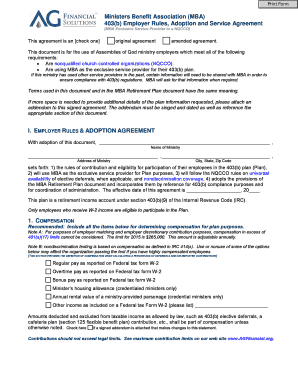
The 403(b) Employer Rules document provides essential guidelines for Assemblies of God ministry employers regarding retirement plans. This comprehensive guide will help you navigate the online form step by step, ensuring that all necessary information is accurately filled out for compliance and effective plan administration.
Follow the steps to complete the 403(b) Employer Rules form.
- Press the ‘Get Form’ button to download the 403(b) Employer Rules document and open it in your preferred online editor.
- Fill out the ministry’s name in the designated section. Ensure that the name is correct and matches your organization’s official registration.
- Select whether the agreement is an original or amended agreement by checking the appropriate box.
- In the Compensation section, clearly define what constitutes compensation for your employees according to the guidelines provided. Include all relevant items such as regular pay, overtime, bonuses, and allowances.
- In the Hours of Service section, clarify how hours will be determined for your employees, adjusting as needed with attachable addendums if required.
- Complete the Employee Contributions section based on whether you offer employee deferral contributions and provide necessary details therein.
- If applicable, detail Employer Contributions following provided guidelines, ensuring to comply with nondiscrimination regulations.
- In the Optional Provision for automatic enrollment, consult with your legal advisor before making changes, ensuring compliance with state laws.
- Review the Former Service Providers section, ensuring you accurately identify any previous vendors utilized prior to the adoption of this agreement.
- Finalize your entries by signing the document as an authorized officer of your ministry. Ensure the date is filled out correctly.
- After reviewing, save the changes, download, print, or share the completed form as required. Ensure a copy is sent to the MBA for their records.
For efficient retirement planning, complete the 403(b) Employer Rules form online today and ensure your ministry complies with all regulations.
Under the special 403(b) catch-up, an employee must have completed at least 15 years of service with the qualified organization sponsoring the plan. Years of service are based on an employee's work period, which may be different from the taxable year.