Loading
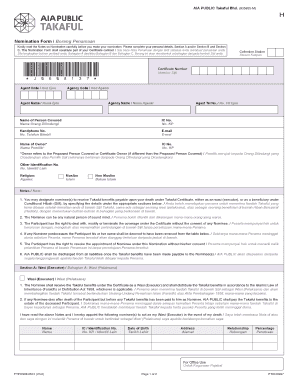
Get Nomination Form / Borang Penamaan
How it works
-

Open form follow the instructions
-

Easily sign the form with your finger
-

Send filled & signed form or save
How to fill out the Nomination Form / Borang Penamaan online
This guide provides clear instructions on how to successfully complete the Nomination Form, also known as Borang Penamaan, online. Follow the steps carefully to ensure that all necessary information is provided accurately.
Follow the steps to fill out the Nomination Form online.
- Click the ‘Get Form’ button to obtain the form and open it in your chosen editor.
- Begin with Section A or Section B. Depending on your role, fill in the required personal details, ensuring accuracy in your name, identification number, and contact information.
- In Section A, appoint a nominee to act as your Wasi (executor). Provide their complete name, identification number, date of birth, address, and relationship to you. Specify the percentage of benefits they will receive.
- If you are filling out Section B, designate a nominee under Conditional Hibah. Similar to Section A, include relevant details of the nominee including their identification number, date of birth, address, and the percentage of benefits they will receive.
- Complete Section C by confirming your understanding and acceptance of the information presented in the form. Sign the declaration and, if required, have it witnessed by another person who will also provide their details.
- Review all sections for accuracy and completeness. Make any necessary corrections before finalizing.
- Once completed, save the changes made to the form. You can download, print for your records, or share it as needed.
Ensure your nomination details are correctly filled out by completing the Nomination Form online today.
Poland Country Code WhatsApp +48.