Loading
Get Summit Urgent Care
How it works
-

Open form follow the instructions
-

Easily sign the form with your finger
-

Send filled & signed form or save
How to fill out the Summit Urgent Care online
Filling out the Summit Urgent Care Patient Intake Form online is a crucial step to ensure a smooth healthcare experience. This guide will provide you with step-by-step instructions on how to complete the form accurately and efficiently.
Follow the steps to complete your Patient Intake Form
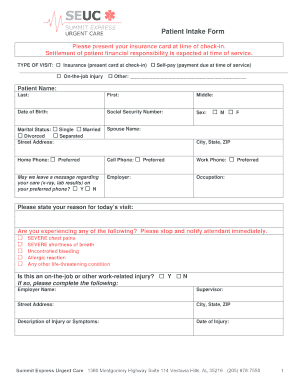
- Click ‘Get Form’ button to access the online form, ensuring you can easily complete it.
- Begin by selecting the type of visit from the options provided: Insurance, Self-pay, or On-the-job injury. If you select 'Other,' please specify.
- Enter your personal information, including your last name, first name, middle name, date of birth, and social security number.
- Indicate your sex and marital status by selecting the appropriate option.
- Provide your street address, city, state, and ZIP code. Include your home, cell, and work phone numbers.
- State your reason for today's visit in the designated field.
- Respond to the medical warning section by indicating if you are experiencing any severe symptoms. If applicable, notify the attendant immediately.
- If your visit is work-related, answer 'Yes' and provide the employer's name, supervisor, and address, along with a description of your injury or symptoms and the date of injury.
- Indicate how you heard about Summit Urgent Care by selecting one of the provided options.
- Fill out the parent or guarantor's information if the patient is not responsible for the charges.
- Enter your insurance information, including carrier, subscriber ID, group number, and policyholder's details.
- Provide your primary care physician's name and indicate whether you would like your chart faxed or mailed.
- List your medical history, including medications, allergies, and any additional conditions for discussion.
- Review the authorization and release section, ensuring you agree to the terms. Sign and date the form for both the patient and responsible party.
- Once you have filled out all sections, save your changes, and choose to download, print, or share the completed form as needed.
Complete your Patient Intake Form online today to ensure your visit goes smoothly and efficiently.
VillageMD has finalized its $8.9 billion acquisition of Summit Health-CityMD, creating one of the largest independent provider groups in the country. VillageMD announced in November 2022 that it had entered a definitive agreement to acquire the primary, specialty, and urgent care provider organization.