Loading
Form preview
  • US Legal Forms
  • Other Templates
  • More Forms
  • More Uncategorized Forms
  • 5350 3

Get 5350 3

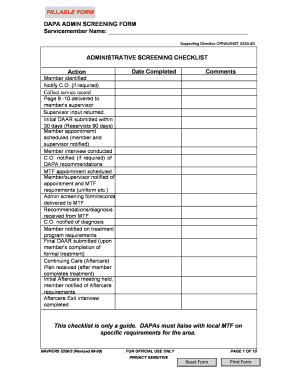
FILLABLE FORM DAPA ADMIN SCREENING FORM Servicemember Name: Supporting Directive OPNAVINST 5350-4D ADMINISTRATIVE SCREENING CHECKLIST Action Member identified Notify C.O. (if required) Collect service.

How it works

  1. Open form

    Open form follow the instructions

  2. Easily sign form

    Easily sign the form with your finger

  3. Share form

    Send filled & signed form or save

How to fill out the 5350 3 online

Filling out the 5350 3, also known as the DAPA Administrative Screening Form, is essential for the evaluation of servicemembers potentially needing intervention or treatment. This guide provides clear and supportive instructions on how to complete the form online, ensuring a smooth and efficient process.

Follow the steps to complete the 5350 3 online.

  1. Click ‘Get Form’ button to access the form and open it in the online editor.
  2. Begin by filling in the servicemember's name along with their rank, birth date, and command details. This information sets the foundation of the form.
  3. Provide details regarding how the Drug and Alcohol Program Advisor (DAPA) became aware of the servicemember's potential problem. You will note whether it was through self-referral, command referral, or incident referral.
  4. Indicate the involvement of substances such as alcohol or illicit drugs, and if applicable, provide details regarding any DUI/DWI incidents or urinalysis tests conducted.
  5. Continue by filling in the servicemember's duty information, including their active duty service date and any previous disciplinary actions that may be relevant.
  6. Document all enlisted evaluations, ensuring to highlight any drug or alcohol-related entries noted in the servicemember’s past reports.
  7. Review the training history related to drug and alcohol education and indicate any relevant courses taken by the servicemember.
  8. Complete the summary of review section by detailing any supporting comments from the commanding officer as necessary.
  9. After all sections are completed accurately, you will be able to save any changes made. You can also download the form for your own records or print it out for submission.

Complete your documents online today for a smoother process.

Get form

Experience a faster way to fill out and sign forms on the web. Access the most extensive library of templates available.
Get form

Related content

Code Section - California Legislative Information
Conservatorship for Gravely Disabled Persons [5350 - 5372]. ( Chapter 3 added by Stats...
Learn more
5350_4D - US Navy - Navy.mil
Jun 4, 2009 — (2) Establish administrative procedures for execution of. OPNAV 5350/1...
Learn more
M5350V1 3G Mobile Wi-Fi User Manual User ... - FCC...
3G Mobile Wi-Fi User Man_TE7M5350V1_rev 3 details for FCC ID TE7M5350V1 made by TP-Link...
Learn more

Related links form

Oriental Insurance Shop Keepers Form Application For Final Expense Life Insurance - Access.uct.org - Access Uct Unicef Structure Yes Is More Bjarke Ingels Pdf Download

Questions & Answers

Get answers to your most pressing questions about US Legal Forms API.

Contact support

Insert the break on the vertical, or “y,” axis of the graph. Draw two parallel and slightly slanted lines through the y-axis between the break in data.

Add an axis break to the chart Right click on a series at the position to add a break and select 'Add break' Left click the axis break to change formatting or style. Drag on the axis break to change the scale.

A broken axis chart is used when the value of a few data is largely deviating from the values of most the others. Applying a normal chart (column chart, line chart, etc.) when there is a large deviation in a data series makes it difficult to compare most of the data because a few data points greatly exceed the others.

In the opening Change Chart Type dialog box, go to the Choose the chart type and axis for your data series section, click the For Broken Y axis box, and select the Scatter with Straight Line from the drop down list, and click the OK button.

What is it? An axis break is a disruption in the continuity of values on either the y or x axis on a chart. It is also known as a scale break or graph break and is shown on the chart as a wavy line or diagonal line on the axis and on the bars plotted on that axis.

To enable scale breaks on the chart Right-click the vertical axis and then click Axis Properties. The VerticalAxis Properties dialog box opens. Select the Enable scale breaks check box.

5:21 9:52 Create Chart with Broken Axis and Bars for Scale Difference - YouTube YouTube Start of suggested clip End of suggested clip And then I go format my shape. And then I want to change my line to some darker color and I want itMoreAnd then I go format my shape. And then I want to change my line to some darker color and I want it to be 1.5. So that you can see like it's actually thin thicker yeah I want it to be a 1.75.

Add an axis break to the chart Right click on a series at the position to add a break and select 'Add break' Left click the axis break to change formatting or style. Drag on the axis break to change the scale.

To enable scale breaks on the chart Right-click the vertical axis and then click Axis Properties. The VerticalAxis Properties dialog box opens. Select the Enable scale breaks check box.

Different than a regular bar chart, a split bar chart can show more than just one value for a category. Instead of creating five separate bar charts, you can instantly present the results for multiple values of one category in one chart.

Get This Form Now!

Use professional pre-built templates to fill in and sign documents online faster. Get access to thousands of forms.
Get form
If you believe that this page should be taken down, please follow our DMCA take down processhere.
Get 5350 3
Get form
  • Adoption
  • Bankruptcy
  • Contractors
  • Divorce
  • Home Sales
  • Employment
  • Identity Theft
  • Incorporation
  • Landlord Tenant
  • Living Trust
  • Name Change
  • Personal Planning
  • Small Business
  • Wills & Estates
  • Packages A-Z
  • Affidavits
  • Bankruptcy
  • Bill of Sale
  • Corporate - LLC
  • Divorce
  • Employment
  • Identity Theft
  • Internet Technology
  • Landlord Tenant
  • Living Wills
  • Name Change
  • Power of Attorney
  • Real Estate
  • Small Estates
  • Wills
  • All Forms
  • Forms A-Z
  • Other Templates
  • Legal Hub
  • About Us
  • Help Portal
  • Legal Resources
  • Blog
  • Affiliates
  • Contact Us
  • Delete My Account
  • Site Map
  • Industries
  • Forms in Spanish
  • Localized Forms
  • State-specific Forms
  • Forms Kit
  • Real Estate Handbook
  • All Guides
  • Notarize
  • Incorporation services
  • For Consumers
  • For Small Business
  • For Attorneys
  • USLegal
  • FormsPass
  • pdfFiller
  • signNow
  • altaFlow
  • DocHub
  • Instapage
Form Packages
  • Adoption
  • Bankruptcy
  • Contractors
  • Divorce
  • Home Sales
  • Employment
  • Identity Theft
  • Incorporation
  • Landlord Tenant
  • Living Trust
  • Name Change
  • Personal Planning
  • Small Business
  • Wills & Estates
  • Packages A-Z
Form Categories
  • Affidavits
  • Bankruptcy
  • Bill of Sale
  • Corporate - LLC
  • Divorce
  • Employment
  • Identity Theft
  • Internet Technology
  • Landlord Tenant
  • Living Wills
  • Name Change
  • Power of Attorney
  • Real Estate
  • Small Estates
  • Wills
  • All Forms
  • Forms A-Z
  • Other Templates
Customer Service
  • Legal Hub
  • About Us
  • Help Portal
  • Legal Resources
  • Blog
  • Affiliates
  • Contact Us
  • Delete My Account
  • Site Map
  • Industries
  • Forms in Spanish
  • Localized Forms
  • State-specific Forms
  • Forms Kit
Legal Guides
  • Real Estate Handbook
  • All Guides
Prepared for you
  • Notarize
  • Incorporation services
Our Customers
  • For Consumers
  • For Small Business
  • For Attorneys
Our Sites
  • USLegal
  • FormsPass
  • pdfFiller
  • signNow
  • altaFlow
  • DocHub
  • Instapage
Social Media
Call us now toll free:
+1 833 426 79 33
As seen in:
© Copyright 1999-2026 airSlate Legal Forms, Inc. 17 Station Street, Suite 303, Brookline, MA 02445
  • Your Privacy Choices
  • Terms of Service
  • Privacy Notice
  • Content Takedown Policy
  • Bug Bounty Program