Loading
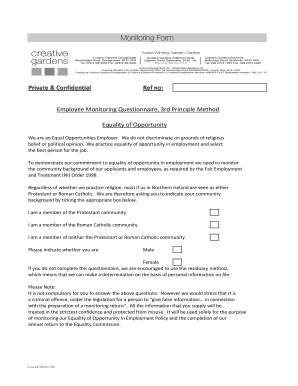
Get Monitoring Form - Creative Gardens
How it works
-

Open form follow the instructions
-

Easily sign the form with your finger
-

Send filled & signed form or save
How to fill out the Monitoring Form - Creative Gardens online
The Monitoring Form - Creative Gardens is designed to collect necessary demographic information for employment monitoring while ensuring equality of opportunity within the workplace. This guide will provide step-by-step instructions on how to accurately fill out the form online, making the process straightforward and hassle-free.
Follow the steps to complete the form accurately online:
- Press the ‘Get Form’ button to access the form and open it in your editing platform.
- You will see a section asking for your community background. Please read the options carefully and select the appropriate box that reflects your community background: whether you identify as a member of the Protestant community, the Roman Catholic community, or neither.
- Next, indicate your gender by selecting either 'Male' or 'Female' from the options provided.
- It's important to note that responding to these questions is not mandatory. However, your honesty is important as providing false information can have legal repercussions.
- Once you have completed all necessary fields, you can review your entries to ensure they are accurate.
- Finally, you have the option to save changes, download, print, or share the form as needed.
Complete the Monitoring Form - Creative Gardens online today to ensure your information is recorded accurately.
Even on a small budget, families can start a gardening practice that will teach children how to relate to the natural world. It will teach botany, entomology, conservation, and resource sustainability naturally and holistically. When planting a first garden, make it small and do not expect rigid results.
Industry-leading security and compliance
US Legal Forms protects your data by complying with industry-specific security standards.
-
In businnes since 199725+ years providing professional legal documents.
-
Accredited businessGuarantees that a business meets BBB accreditation standards in the US and Canada.
-
Secured by BraintreeValidated Level 1 PCI DSS compliant payment gateway that accepts most major credit and debit card brands from across the globe.