Loading
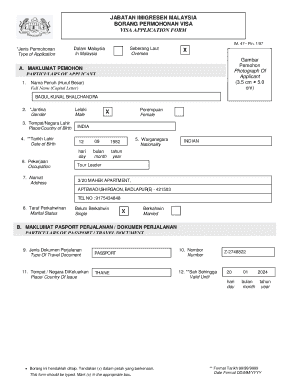
Get Imigresen Malaysia Email
How it works
-

Open form follow the instructions
-

Easily sign the form with your finger
-

Send filled & signed form or save
How to fill out the Imigresen Malaysia Email online
Filling out the Imigresen Malaysia Email is an important step for those looking to apply for a visa. This guide provides clear and concise instructions for each section of the form, ensuring that all applicants can complete it accurately and confidently.
Follow the steps to complete the Imigresen Malaysia Email form online.
- Press the ‘Get Form’ button to access the form and open it in an editing tool.
- Begin by selecting the type of application by marking the box for either 'Oversea' or 'In Malaysia'.
- Insert a clear photograph of the applicant in the designated area, ensuring it measures 3.5 cm by 5.0 cm.
- In the 'Particulars of Applicant' section, fill in the full name using capital letters as specified.
- Select the gender by marking the appropriate box for 'Male' or 'Female'.
- Provide the place or country of birth.
- Enter the date of birth using the specified format (DD/MM/YYYY).
- Fill in the nationality accurately.
- Specify the occupation of the applicant.
- Complete the address section with the full residential address of the applicant.
- Indicate the marital status by marking the relevant option.
- In the 'Particulars of Passport/Travel Document' section, select the type of travel document, usually 'Passport'.
- Enter the passport number.
- Specify the place or country of issue for the travel document.
- Provide the expiration date of the passport using the date format (DD/MM/YYYY).
- In the 'Particulars of Sponsor in Malaysia', enter the full name, NRIC, telephone number, and address of the sponsor.
- State the proposed duration of stay clearly.
- Select the purpose of the journey by marking the appropriate box.
- Provide the intended date of travel using the specified format (DD/MM/YYYY).
- Finally, the applicant or sponsor must sign in the indicated area to validate the application.
- Once the form is completed, ensure to save the changes. Download, print, or share the form as required.
Complete your Imigresen Malaysia Email online today for a seamless application process.
Please visit the Immigration Department's Official Portal for further information. For travel abroad, travel status checks can be made using kiosk machines provided at Kuala Lumpur International Airport (KLIA and KLIA2) and they are before the check-in counter.