Loading
Form preview
  • US Legal Forms
  • Form Library
  • More Forms
  • More Multi-State Forms
  • Cff Form Philhealth

Get Cff Form Philhealth

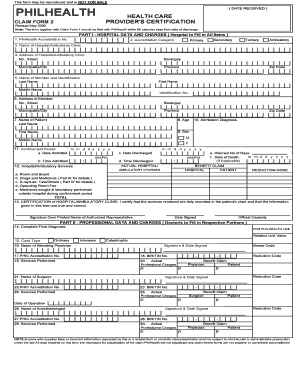
This form may be reproduced and is NOT FOR SALE PHILHEALTH CLAIM FORM 2 Revised May 2000 HEALTH CARE PROVIDER'S CERTIFICATION Note: This form together with Claim Form 1 should be filed with PhilHealth.

How it works

  1. Open form

    Open form follow the instructions

  2. Easily sign form

    Easily sign the form with your finger

  3. Share form

    Send filled & signed form or save

How to fill out the Cff Form Philhealth online

Filling out the Cff Form Philhealth is crucial for processing healthcare claims efficiently. This guide provides a step-by-step approach to help users complete the form online with clarity and precision.

Follow the steps to successfully fill out the Cff Form Philhealth.

  1. Press the 'Get Form' button to acquire the Cff Form Philhealth and open it in your online editor.
  2. Begin with Part I, where the hospital data and charges will be filled out. Ensure that the PhilHealth accreditation number and category (primary, secondary, tertiary, or ambulatory) are accurately entered. Provide the complete name and address of the hospital or ambulatory clinic.
  3. Next, document the details of the member. Fill in their last name, first name, middle name, and identification number, along with their address.
  4. Enter the patient's name, age, sex, and the admission diagnosis in the relevant fields.
  5. Record the confinement period, including the date and time admitted, as well as the date and time discharged. Calculate the number of days confined and fill in any applicable details regarding the date of death if relevant.
  6. In the benefit claim section, list the hospital services provided, including room and board, drugs, medicines, and any other applicable charges with their respective totals.
  7. After completing Part I, proceed to Part II, where the professional data and charges are recorded by the attending physician. They will need to fill in their name, accreditation number, and services performed.
  8. Continue to Part III and IV, detailing any drugs, medicines, x-ray, laboratory tests, and other related services. Make sure to attach official receipts for any outside purchases.
  9. In Part V, the patient or member must certify the accuracy of the information provided, detailing any deductions made from hospital or professional fee charges.
  10. After all sections are accurately completed, save your changes and prepare to download, print, or share the completed form as needed.

Start filing your Cff Form Philhealth online today for a smoother claims process.

Get form

Experience a faster way to fill out and sign forms on the web. Access the most extensive library of templates available.
Get form

Related content

Download - The Oceans and Fisheries Partnership
by ARD Tetra Tech · 2018 — (CTI-CFF) that works with public and private sector partners...
Learn more
little boy fonts - Meritopedia
Some fonts include the historical forms as alternates, so they can be used for a ... OT...
Learn more

Related links form

IRS Form 965-A 2021 MD Montgomery County Public Schools Form 560-51 2024 IRS Form 9783 2011 AU NAT 71121 2012

Questions & Answers

Get answers to your most pressing questions about US Legal Forms API.

Contact support

Enables flexibility to migrate between technologies and future-proof product designs. Home / IoT Modules / Future Proof Form Factors.

What are the Important Requirements for PhilHealth Benefits? CF1 – Claim Form 1: Accomplished and originally signed by member and employer. CF2 – Claim Form 2: Accomplished and originally signed by Attending Physician, Surgeon, Anaesthesiologist and patient or next of kin if patient is unable to sign.

“This is to certify that the required 3/6 monthly premium contributions plus at least 6 months contributions preceding the 3 months qualifying contributions within 12 month period prior to the first day of confinement (sufficient regularity) have been regularly remitted to PhilHealth.

Claim Form 1 (CF1) CF1 is divided into two parts: Part I - Member and Patient Information requires information about the member and patient to ascertain the identity of the member/patient/dependent for eligibility to PhilHealth benefits. Part II - Employer's Certification. (for employed members' only)

Pursuant to PhilHealth Circular 2016-0016 on the full implementation of the Electronic Claims, the Claim Signature Form (CSF) is one of the mandatory scanned image attachments in claims adjudication.

An intermediate package for previously managed as probable COVID-19 case but had negative RT-PCR test results are also covered with the Intermediate package amounting to P18,000 and P38,000 for moderate and severe/ critical pneumonia, respectively.

Claim Form 2 (CF2) shall be accomplished and submitted for ALL claim applications except for confinement abroad. 2. CF2 shall be accomplished using capital letters and by checking the appropriate boxes. All items should be marked legibly by using ballpen only.

Get This Form Now!

Use professional pre-built templates to fill in and sign documents online faster. Get access to thousands of forms.
Get form
If you believe that this page should be taken down, please follow our DMCA take down processhere.
Get Cff Form Philhealth
Get form
  • Adoption
  • Bankruptcy
  • Contractors
  • Divorce
  • Home Sales
  • Employment
  • Identity Theft
  • Incorporation
  • Landlord Tenant
  • Living Trust
  • Name Change
  • Personal Planning
  • Small Business
  • Wills & Estates
  • Packages A-Z
  • Affidavits
  • Bankruptcy
  • Bill of Sale
  • Corporate - LLC
  • Divorce
  • Employment
  • Identity Theft
  • Internet Technology
  • Landlord Tenant
  • Living Wills
  • Name Change
  • Power of Attorney
  • Real Estate
  • Small Estates
  • Wills
  • All Forms
  • Forms A-Z
  • Form Library
  • Legal Hub
  • About Us
  • Help Portal
  • Legal Resources
  • Blog
  • Affiliates
  • Contact Us
  • Delete My Account
  • Site Map
  • Industries
  • Forms in Spanish
  • Localized Forms
  • State-specific Forms
  • Forms Kit
  • Real Estate Handbook
  • All Guides
  • Notarize
  • Incorporation services
  • For Consumers
  • For Small Business
  • For Attorneys
  • USLegal
  • FormsPass
  • pdfFiller
  • signNow
  • altaFlow
  • DocHub
  • Instapage
Form Packages
  • Adoption
  • Bankruptcy
  • Contractors
  • Divorce
  • Home Sales
  • Employment
  • Identity Theft
  • Incorporation
  • Landlord Tenant
  • Living Trust
  • Name Change
  • Personal Planning
  • Small Business
  • Wills & Estates
  • Packages A-Z
Form Categories
  • Affidavits
  • Bankruptcy
  • Bill of Sale
  • Corporate - LLC
  • Divorce
  • Employment
  • Identity Theft
  • Internet Technology
  • Landlord Tenant
  • Living Wills
  • Name Change
  • Power of Attorney
  • Real Estate
  • Small Estates
  • Wills
  • All Forms
  • Forms A-Z
  • Form Library
Customer Service
  • Legal Hub
  • About Us
  • Help Portal
  • Legal Resources
  • Blog
  • Affiliates
  • Contact Us
  • Delete My Account
  • Site Map
  • Industries
  • Forms in Spanish
  • Localized Forms
  • State-specific Forms
  • Forms Kit
Legal Guides
  • Real Estate Handbook
  • All Guides
Prepared for you
  • Notarize
  • Incorporation services
Our Customers
  • For Consumers
  • For Small Business
  • For Attorneys
Our Sites
  • USLegal
  • FormsPass
  • pdfFiller
  • signNow
  • altaFlow
  • DocHub
  • Instapage
Social Media
Call us now toll free:
+1 833 426 79 33
As seen in:
© Copyright 1999-2026 airSlate Legal Forms, Inc. 17 Station Street, Suite 303, Brookline, MA 02445
  • Your Privacy Choices
  • Terms of Service
  • Privacy Notice
  • Content Takedown Policy
  • Bug Bounty Program