Loading
Form preview
  • US Legal Forms
  • Form Library
  • More Forms
  • More Uncategorized Forms
  • Certified Forensic Claims Consultant

Get Certified Forensic Claims Consultant

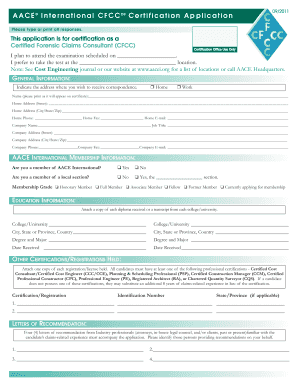
Certified Forensic Claims Consultant (CFCC ) TM TM AACE International Certification A MARK OF DISTINCTION A MARK OF DISTINCTION 09/2011 AACE International s CERTIFIED FORENSIC CLAIMS CONSULTANT (CFCC.

How it works

  1. Open form

    Open form follow the instructions

  2. Easily sign form

    Easily sign the form with your finger

  3. Share form

    Send filled & signed form or save

How to fill out the Certified Forensic Claims Consultant online

This guide provides you with a clear, step-by-step approach to completing the Certified Forensic Claims Consultant (CFCC) application online. By following these instructions, you'll ensure that all necessary information is accurately submitted.

Follow the steps to successfully complete the CFCC application online.

  1. Click the ‘Get Form’ button to obtain the CFCC application. This will allow you to open the document in your chosen editor.
  2. Begin with filling out the general information section. This includes your name, home address, and contact details. Ensure that the name is printed exactly as you would like it to appear on your certificate.
  3. Complete the AACE International membership information section. Indicate whether you are a member of AACE International or a local section, along with your membership grade.
  4. Proceed to the education information section. Attach relevant diplomas or transcripts from the colleges or universities you attended, and fill out the details for each institution.
  5. In the other certifications/registrations held section, list your professional certifications. Ensure you include identification numbers and relevant details for each certification.
  6. Provide four letters of recommendation from industry professionals. Identify these individuals in the designated section of the application.
  7. Document your work experience chronologically. List each job's duration, title, company name, location, supervisor, and a brief description of your duties.
  8. Attach the required written report or professional paper that you have authored within the last 24 months, as per the application guidelines.
  9. Review the checklist at the end of the application to ensure that you have included all required documents, including payment.
  10. Once you have checked all fields for accuracy, submit the application by the deadline noted on AACE’s website.

Complete your Certified Forensic Claims Consultant application online today to elevate your professional credentials.

Get form

Experience a faster way to fill out and sign forms on the web. Access the most extensive library of templates available.
Get form

Related content

Providing Assistance in Avoiding and Resolving...
International (AACE, Int.); AACE, Int. Certified Forensic Claims Consultant. EDUCATION...
Learn more
Certification: Certified Forensic Claims...
Certification Details. Work Experience Required? Yes. Oral or Written Exam Required? Yes...
Learn more
AACE International - AACE International - qaz.wiki
... die bovendien vereist een technisch document indiening; Certified Estimating...
Learn more

Related links form

Veer Narmad South Gujarat University, Surat Invites Applications For Teaching Positions For Baptismal Form Mullingar Qvcc Commnet Handyman Application - Baxmanagement.com

Questions & Answers

Get answers to your most pressing questions about US Legal Forms API.

Contact support

Logarithmic scales are useful when the data you are displaying is much less or much more than the rest of the data or when the percentage differences between values are important. You can specify whether to use a logarithmic scale, if the values in the chart cover a very large range.

Pick input values (that is, x-values) that are powers of the base; for instance, if the log's base is 5, then pick x-values like 52 and 5−1. List the corresponding y-values; for instance, log5(52) = 2 = y and log5(5−1) = −1 = y. Plot the points, taking care not to have the graph cross the vertical asymptote.

Creating a Log Log Chart in Excel Select the data that you want to plot. Click the Insert tab, and then click Scatter. Click Scatter with only Markers. Click OK. Right-click the x-axis, and then click Format Axis. Under Axis Type, click Logarithmic scale. Click OK. Right-click the y-axis, and then click Format Axis.

The logarithmic function, y=logb(x) , can be shifted k units vertically and h units horizontally with the equation y=logb(x+h)+k . If k>0 , the graph would be shifted upwards. If k<0 , the graph would be shifted downwards. If h>0 , the graph would be shifted left.

You could show the actual numbers (e.g., 103, 104) and label the axis as “time [s]”, or you could plot the logarithms (e.g., 3, 4) and label the axis as “log10time1 s [unitless]”. Some people will abbreviate this as “log(time) []” and figure they'll be understood.

To create a Log-Log plot in base R we pass log(data) as data argument instead of data in the plot() function. The log() function converts the data value into its logarithmic value. The log() function by default calculates the natural logarithms.

If Y = log(y) and X = log(x) then Y = nX. This shows the linear relationship. Plotting Y against X, i.e., log(y) against log(x), leads to a straight line as shown below.

Get This Form Now!

Use professional pre-built templates to fill in and sign documents online faster. Get access to thousands of forms.
Get form
If you believe that this page should be taken down, please follow our DMCA take down processhere.
Get Certified Forensic Claims Consultant
Get form
  • Adoption
  • Bankruptcy
  • Contractors
  • Divorce
  • Home Sales
  • Employment
  • Identity Theft
  • Incorporation
  • Landlord Tenant
  • Living Trust
  • Name Change
  • Personal Planning
  • Small Business
  • Wills & Estates
  • Packages A-Z
  • Affidavits
  • Bankruptcy
  • Bill of Sale
  • Corporate - LLC
  • Divorce
  • Employment
  • Identity Theft
  • Internet Technology
  • Landlord Tenant
  • Living Wills
  • Name Change
  • Power of Attorney
  • Real Estate
  • Small Estates
  • Wills
  • All Forms
  • Forms A-Z
  • Form Library
  • Legal Hub
  • About Us
  • Help Portal
  • Legal Resources
  • Blog
  • Affiliates
  • Contact Us
  • Delete My Account
  • Site Map
  • Industries
  • Forms in Spanish
  • Localized Forms
  • State-specific Forms
  • Forms Kit
  • Real Estate Handbook
  • All Guides
  • Notarize
  • Incorporation services
  • For Consumers
  • For Small Business
  • For Attorneys
  • USLegal
  • FormsPass
  • pdfFiller
  • signNow
  • altaFlow
  • DocHub
  • Instapage
Form Packages
  • Adoption
  • Bankruptcy
  • Contractors
  • Divorce
  • Home Sales
  • Employment
  • Identity Theft
  • Incorporation
  • Landlord Tenant
  • Living Trust
  • Name Change
  • Personal Planning
  • Small Business
  • Wills & Estates
  • Packages A-Z
Form Categories
  • Affidavits
  • Bankruptcy
  • Bill of Sale
  • Corporate - LLC
  • Divorce
  • Employment
  • Identity Theft
  • Internet Technology
  • Landlord Tenant
  • Living Wills
  • Name Change
  • Power of Attorney
  • Real Estate
  • Small Estates
  • Wills
  • All Forms
  • Forms A-Z
  • Form Library
Customer Service
  • Legal Hub
  • About Us
  • Help Portal
  • Legal Resources
  • Blog
  • Affiliates
  • Contact Us
  • Delete My Account
  • Site Map
  • Industries
  • Forms in Spanish
  • Localized Forms
  • State-specific Forms
  • Forms Kit
Legal Guides
  • Real Estate Handbook
  • All Guides
Prepared for you
  • Notarize
  • Incorporation services
Our Customers
  • For Consumers
  • For Small Business
  • For Attorneys
Our Sites
  • USLegal
  • FormsPass
  • pdfFiller
  • signNow
  • altaFlow
  • DocHub
  • Instapage
Social Media
Call us now toll free:
+1 833 426 79 33
As seen in:
© Copyright 1999-2026 airSlate Legal Forms, Inc. 3720 Flowood Dr, Flowood, Mississippi 39232
  • Your Privacy Choices
  • Terms of Service
  • Privacy Notice
  • Content Takedown Policy
  • Bug Bounty Program