Loading
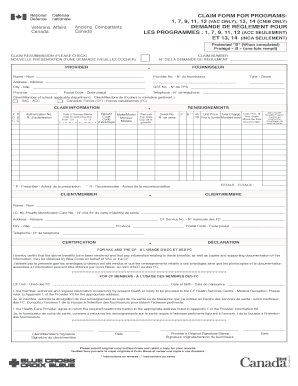
Get Claim Form For Program 1 7 9 11 12
How it works
-

Open form follow the instructions
-

Easily sign the form with your finger
-

Send filled & signed form or save
How to fill out the Claim Form For Program 1 7 9 11 12 online
Filling out the Claim Form For Program 1 7 9 11 12 online can simplify the process of submitting necessary claims for eligible benefits. This guide provides a step-by-step approach to ensure that all information is accurately completed for a successful submission.
Follow the steps to complete the Claim Form effectively.
- Press the ‘Get Form’ button to obtain the Claim Form For Program 1 7 9 11 12 and open it in the online editor.
- Fill in your provider information including the provider name, address, GST number, and telephone number in the designated fields.
- Enter your provider identification number as referenced in Appendix 1 of your Provider Kit.
- Select the type of provider from the options available, as found in Appendix 1.
- Indicate which department your client or member represents by checking either VAC or Canadian Forces.
- In the claim information section, enter the numeric program code for the service being claimed.
- Write the authorization number if it is applicable. If you are affiliated with Canadian Forces, attach a pre-authorization form as needed.
- Input the date of service in the format of day-month-year. If the claim is for rental equipment, include both the start and end dates.
- Fill in the benefit code that corresponds to the specific service provided.
- Provide a description of the items for the claim, including the make and model if needed.
- If applicable, enter the warranty expiration date and the serial number for the item.
- If a prescription is required, ensure you have the prescriber’s designation properly noted.
- If there is a recommendation required, include the recommender’s designation.
- Enter the quantity of services or items being claimed.
- Complete the unit price for each item or service.
- Calculate and enter the total charge for the claims made.
- If applicable, specify the amount to be billed to the provincial program for VAC.
- Enter the total amount to be billed.
- Complete the client/member information by entering their name, address, and telephone number.
- Input the client/member's health identification number and, if applicable, the CF service number.
- The client/member must sign and date the form to certify the accuracy of the claim.
- The health care provider's original signature or stamp and the date must also be provided.
- Finally, review the form for accuracy, then save, download, print, or share the form as needed after completing the fields.
Take action today and fill out your Claim Form online to ensure prompt processing of your benefits.
Industry-leading security and compliance
US Legal Forms protects your data by complying with industry-specific security standards.
-
In businnes since 199725+ years providing professional legal documents.
-
Accredited businessGuarantees that a business meets BBB accreditation standards in the US and Canada.
-
Secured by BraintreeValidated Level 1 PCI DSS compliant payment gateway that accepts most major credit and debit card brands from across the globe.