Loading
Get Ntiso
How it works
-

Open form follow the instructions
-

Easily sign the form with your finger
-

Send filled & signed form or save
How to fill out the Ntiso online
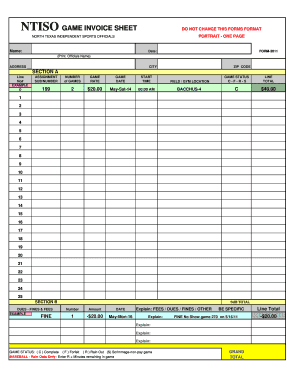
This guide provides clear and concise instructions for users who need assistance in filling out the Ntiso game invoice sheet. Follow the step-by-step process to ensure accurate completion of the form.
Follow the steps to complete the Ntiso game invoice sheet online.
- Click ‘Get Form’ button to obtain the form and open it in your online editor.
- Begin filling in your personal details at the top of the form. This includes your name, address, city, and zip code. Ensure all information is accurate.
- Proceed to Section A, where you will need to fill in the assignment details for each game. Enter the line number, assignment number, the total number of games played, the game rate, the date of the game, the start time, the location of the game (field or gym), and the game status (C for Complete, F for Forfeit, R for Rain Out, S for Scrimmage).
- For each game, calculate and input the line total in the respective field. Repeat this process for all relevant games up to 25 lines as required.
- Next, move to Section B for dues, fines, and fees. Fill in the specific fines or dues charged, including the amount and date of each occurrence. Be specific in your descriptions.
- After listing all fines and dues, calculate your grand total by adding all line totals and subtracting any fines, ensuring accuracy in your calculations.
- Once you have filled out all required sections, review the form for any errors. Make the necessary corrections to ensure all information is accurate and complete.
- Finally, save your changes, download a copy for your records, print the form if needed, or share it as required.
Complete your Ntiso game invoice sheet online today for accurate and efficient documentation.
Industry-leading security and compliance
US Legal Forms protects your data by complying with industry-specific security standards.
-
In businnes since 199725+ years providing professional legal documents.
-
Accredited businessGuarantees that a business meets BBB accreditation standards in the US and Canada.
-
Secured by BraintreeValidated Level 1 PCI DSS compliant payment gateway that accepts most major credit and debit card brands from across the globe.