Loading
Get Official Passport Action Request (opar) Form - Ars Usda
How it works
-

Open form follow the instructions
-

Easily sign the form with your finger
-

Send filled & signed form or save
How to fill out the Official Passport Action Request (OPAR) Form - Ars Usda online
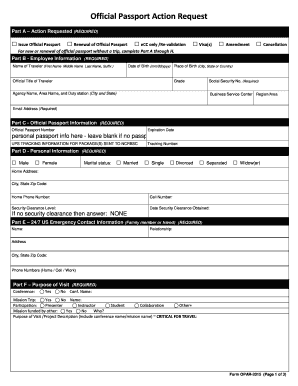
This guide aims to assist users in completing the Official Passport Action Request (OPAR) Form for the United States Department of Agriculture online. By following the outlined steps, you will effectively navigate through the various sections and fields to ensure all necessary information is provided.
Follow the steps to successfully complete the OPAR form online.
- Click the ‘Get Form’ button to obtain the form and open it in your preferred document editor.
- In Part A, select the action you are requesting by checking one of the options: Issue Official Passport, Renewal of Official Passport, eCC only / Re-validation, Visa(s), Amendment, or Cancellation.
- In Part B, fill out the Employee Information section. Include the name of the traveler, date of birth, place of birth, official title, grade, social security number, agency name, area name, duty station, business service center region/area, and an email address.
- Proceed to Part C and provide the Official Passport Information. Enter your official passport number and expiration date. If you do not have a passport, leave this section blank.
- In Part D, complete the Personal Information section. Indicate your gender, marital status, home address, home phone number, cell number, security clearance level, and the date security clearance was obtained.
- For Part E, enter the 24/7 US Emergency Contact Information. List a family member or friend, their relationship to you, and their contact details.
- In Part F, specify the Purpose of Visit by indicating whether it involves a conference or mission trip, and provide relevant details about the participation and funding.
- For Part G, assess whether you require Embassy Assistance or Services. Provide information regarding hotel reservations, airport transportation, or any other assistance needed.
- In Part H, outline your Travel Itinerary, including destination country, cities, start date, and end date.
- Complete Part I with your US Contact Information, including the USDA agency and contact details.
- In Part J, fill out the In-Country Contact Information. Provide the name, business or agency affiliation, phone number, and email address for your in-country contact.
- For Part K, detail your Carrier Information, including the carrier name and flight number, departure point, and relevant dates and times.
- In Part L, enter the Hotel Information, including the hotel name, street address, city and country, and local telephone number.
- Part M is for comments intended only for the BSC Travel Specialist. Provide any additional notes here.
- Review all entries for accuracy, then save changes, and download, print, or share the completed form as necessary.
Begin filling out your Official Passport Action Request form online today.
Matplotlib – Plot over an image background in Python Read an image from a file into an array. Create a figure (fig) and add a set of subplots (ax) with extent [0, 300, 0, 300]. Create an array x of range (300). Plot x using plot() method with linestyle=dotted, linewidth=2, and color=red.