Loading
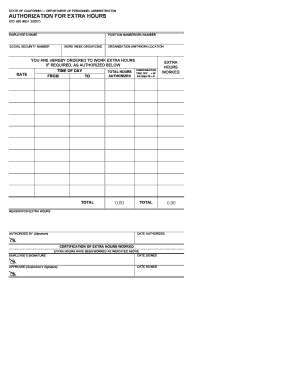
Get Page 1 State Of California Department Of ...
How it works
-

Open form follow the instructions
-

Easily sign the form with your finger
-

Send filled & signed form or save
How to fill out the Page 1 STATE OF CALIFORNIA DEPARTMENT OF PERSONNEL ADMINISTRATION online
This guide provides a straightforward process for completing the Page 1 document from the State of California Department of Personnel Administration online. By following these instructions, users can ensure accurate and efficient documentation of extra hours worked.
Follow the steps to complete your authorization for extra hours form.
- Click ‘Get Form’ button to obtain the form and open it in the editor.
- Begin by filling out the employee's name in the designated field. This should be the full name of the person who is authorized to work extra hours.
- Next, enter the position number or ARU number in the corresponding field. This number identifies the specific role of the employee within the organization.
- Provide the employee's social security number. Ensure that this information is entered accurately to avoid any issues with payroll.
- Indicate the work week group or CBID within the appropriate section, as this reflects the classification of the employee.
- Fill in the organization unit and work location. This helps to specify where the employee works and which department is responsible for authorizing the extra hours.
- Complete the compensation section by indicating the time of day, total hours worked, and whether those hours will be taken off or are to be paid.
- Specify the reason for the extra hours in the provided field, this should outline the purpose of the additional work.
- After filling out the details, input the date authorized and provide the signature of the authorized personnel in the designated section.
- Employees should then sign and date the certification of extra hours worked section to confirm their agreement with the submitted information.
- Finally, once all fields are completed accurately, you can choose to save changes, download, print, or share the form for submission.
Complete your forms online easily and efficiently today!
Please visit The Work Number website or call 1 (800) 367-5690.
Industry-leading security and compliance
US Legal Forms protects your data by complying with industry-specific security standards.
-
In businnes since 199725+ years providing professional legal documents.
-
Accredited businessGuarantees that a business meets BBB accreditation standards in the US and Canada.
-
Secured by BraintreeValidated Level 1 PCI DSS compliant payment gateway that accepts most major credit and debit card brands from across the globe.