Loading
Form preview
  • US Legal Forms
  • Other Templates
  • More Forms
  • More Uncategorized Forms
  • Vehicle Book-out Sheet - All Credit Acceptance

Get Vehicle Book-out Sheet - All Credit Acceptance

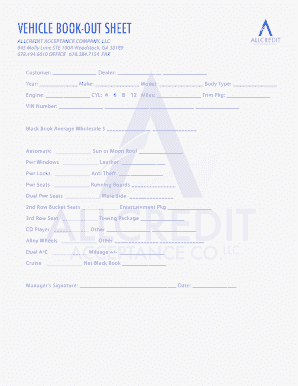
Vehicle bookout sheet. allcredit acceptance co.llc . created date: 2/4/2010 12:34:02 pm .

How it works

  1. Open form

    Open form follow the instructions

  2. Easily sign form

    Easily sign the form with your finger

  3. Share form

    Send filled & signed form or save

How to use or fill out the VEHICLE BOOK-OUT SHEET - All Credit Acceptance online

Filling out the VEHICLE BOOK-OUT SHEET is an essential step for properly documenting vehicle transactions with All Credit Acceptance. This guide will walk you through the process of completing this form online, ensuring that you provide all necessary information accurately.

Follow the steps to complete the form accurately.

  1. Click ‘Get Form’ button to obtain the form and open it in the editor.
  2. Begin by entering the customer name in the designated 'Customer' field to identify the individual making the vehicle transaction.
  3. Fill in the 'Dealer' information which signifies the dealership involved in the transaction.
  4. Complete the fields for 'Year,' 'Make,' 'Model,' and 'Body Type' to provide details about the vehicle being booked out.
  5. In the 'Engine' field, specify the engine type and select the number of cylinders from the given options (4, 6, 8, 12).
  6. Enter the vehicle 'Miles' as recorded on the odometer to indicate the total mileage.
  7. Provide the 'VIN Number' (Vehicle Identification Number), which is vital for uniquely identifying the vehicle.
  8. Input the 'Black Book Average Wholesale' value to reflect the standard wholesale price for the vehicle.
  9. Indicate any additional features the vehicle may have, such as 'Automatic,' 'Sun or Moon Roof,' 'Pwr Windows,' and others by checking the appropriate boxes.
  10. If there are any additional options or features not listed, you may specify them in the 'Other' fields.
  11. Fill in 'Mileage +/-' for any adjustments needed to the recorded mileage.
  12. Record the 'Net Black Book' value to establish the final assessment of the vehicle's value.
  13. Have the manager provide their signature in the 'Manager’s Signature' field to validate the information entered, along with the date.
  14. Lastly, review all entered data for accuracy before saving, downloading, printing, or sharing the completed form.

Complete your documents online today for a seamless transaction experience.

Get form

Experience a faster way to fill out and sign forms on the web. Access the most extensive library of templates available.
Get form

Related content

Case 6:11-cv-00033-NKM Document 2 Filed 08/30/11...
Aug 30, 2011 — Credit Acceptance reviewed Ms. Snead's credit history on January...
Learn more
Vehicle Repossession | FTC Consumer Information
Here's “must know” information about when and how your car can be ... if you don't...
Learn more
Vehicle - Wikipedia
A vehicle (from Latin: vehiculum) is a machine that transports people or cargo. Vehicles...
Learn more

Related links form

University Of Bridgeport Transcript Request Housing Application Form - Charnwood Borough Council Migränekalender Excel Button Inserts - 1 Line - Ross Video

Questions & Answers

Get answers to your most pressing questions about US Legal Forms API.

Contact support

What Is a Vehicle Bookout? A bookout is essentially a detailed invoice process, which provides a lender with a comprehensive summary of a vehicle's value. Bookouts give both buyers and lenders a complete picture of how the vehicle came off the manufacturer's production line, and what it's worth at any given point.

What is a nada book out? Designed for serious users, BookOut is the only tool that allows you to import used car values into a DealerTrack® credit application with just one click. Book the best deal. Easily view N.A.D.A., Kelley Blue Book and Black Book values—without the hassle of changing screens or re-entering data.

The book value of an asset refers to its cost minus depreciation over time. It is the value of an asset based on its balance sheet.

Book Value = (Total Common Shareholders Equity – Preferred Stock) /Number of Outstanding Common Shares.

Mathematically, book value is the difference between a company's total assets and total liabilities. Suppose that XYZ Company has total assets of $100 million and total liabilities of $80 million. Then, the book valuation of the company is $20 million.

Book value is the accounting value of a company's assets less liabilities. In other words, it is the expected value that a firm can expect if it were to sell all of the assets on its balance sheet and cover its outstanding debts and obligations.

Tangible book value is the same thing as book value except it excludes the value of intangible assets. Intangible assets, such as goodwill, are assets that you can't see or touch. Intangible assets have value, just not in the same way that tangible assets do; you cannot easily liquidate them.

Get This Form Now!

Use professional pre-built templates to fill in and sign documents online faster. Get access to thousands of forms.
Get form
If you believe that this page should be taken down, please follow our DMCA take down processhere.
Get VEHICLE BOOK-OUT SHEET - All Credit Acceptance
Get form
  • Adoption
  • Bankruptcy
  • Contractors
  • Divorce
  • Home Sales
  • Employment
  • Identity Theft
  • Incorporation
  • Landlord Tenant
  • Living Trust
  • Name Change
  • Personal Planning
  • Small Business
  • Wills & Estates
  • Packages A-Z
  • Affidavits
  • Bankruptcy
  • Bill of Sale
  • Corporate - LLC
  • Divorce
  • Employment
  • Identity Theft
  • Internet Technology
  • Landlord Tenant
  • Living Wills
  • Name Change
  • Power of Attorney
  • Real Estate
  • Small Estates
  • Wills
  • All Forms
  • Forms A-Z
  • Other Templates
  • Legal Hub
  • About Us
  • Help Portal
  • Legal Resources
  • Blog
  • Affiliates
  • Contact Us
  • Delete My Account
  • Site Map
  • Industries
  • Forms in Spanish
  • Localized Forms
  • State-specific Forms
  • Forms Kit
  • Real Estate Handbook
  • All Guides
  • Notarize
  • Incorporation services
  • For Consumers
  • For Small Business
  • For Attorneys
  • USLegal
  • FormsPass
  • pdfFiller
  • signNow
  • altaFlow
  • DocHub
  • Instapage
Form Packages
  • Adoption
  • Bankruptcy
  • Contractors
  • Divorce
  • Home Sales
  • Employment
  • Identity Theft
  • Incorporation
  • Landlord Tenant
  • Living Trust
  • Name Change
  • Personal Planning
  • Small Business
  • Wills & Estates
  • Packages A-Z
Form Categories
  • Affidavits
  • Bankruptcy
  • Bill of Sale
  • Corporate - LLC
  • Divorce
  • Employment
  • Identity Theft
  • Internet Technology
  • Landlord Tenant
  • Living Wills
  • Name Change
  • Power of Attorney
  • Real Estate
  • Small Estates
  • Wills
  • All Forms
  • Forms A-Z
  • Other Templates
Customer Service
  • Legal Hub
  • About Us
  • Help Portal
  • Legal Resources
  • Blog
  • Affiliates
  • Contact Us
  • Delete My Account
  • Site Map
  • Industries
  • Forms in Spanish
  • Localized Forms
  • State-specific Forms
  • Forms Kit
Legal Guides
  • Real Estate Handbook
  • All Guides
Prepared for you
  • Notarize
  • Incorporation services
Our Customers
  • For Consumers
  • For Small Business
  • For Attorneys
Our Sites
  • USLegal
  • FormsPass
  • pdfFiller
  • signNow
  • altaFlow
  • DocHub
  • Instapage
Social Media
Call us now toll free:
+1 833 426 79 33
As seen in:
© Copyright 1999-2026 airSlate Legal Forms, Inc. 17 Station Street, Ste. 203, Brookline, MA 02445
  • Your Privacy Choices
  • Terms of Service
  • Privacy Notice
  • Content Takedown Policy
  • Bug Bounty Program