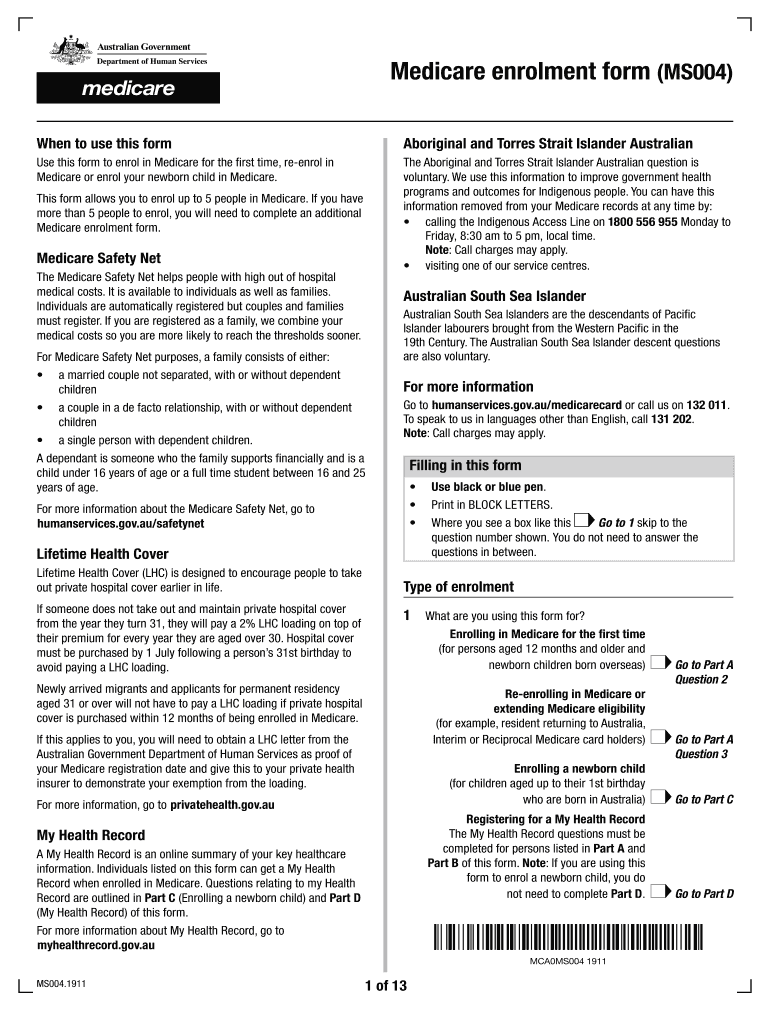
Wborn child in Medicare. The Aboriginal and Torres Strait Islander Australian question is voluntary. We use this information to improve government health programs and outcomes for Indigenous people. You can have this information removed from your Medicare records at any time by: calling the Indigenous Access Line on 1800 556 955 Monday to Friday, 8:30 am to 5 pm, local time. Note: Call charges may apply. visiting one of our service centres. This form allows you to enrol up to 5 people.
Loading

Open form follow the instructions

Easily sign the form with your finger

Send filled & signed form or save
How to fill out the AU DHS MS004 online
This guide provides step-by-step instructions on how to fill out the AU DHS MS004 form to enroll in Medicare. It aims to assist users who may be unfamiliar with the process, ensuring a smooth and efficient submission of their information online.
Follow the steps to successfully complete the AU DHS MS004 form online:
- Click the ‘Get Form’ button to obtain the AU DHS MS004 form and open it in the editor. Ensure you are ready to provide all required information as outlined.
- Identify the type of enrollment you are applying for in the first section. Options may include enrolling for the first time, re-enrolling, or enrolling a newborn child. Select the appropriate option that suits your situation.
- Gather and prepare the required documentation as per the instructions for the selected enrollment type. For example, Australian citizens must provide a birth certificate or passport along with two residency documents.
- Complete Part A for your details including your Medicare card number, contact information, and whether you are of Aboriginal or Torres Strait Islander descent if applicable.
- Fill out the details for any additional people you wish to enroll by completing Part B. If enrolling more than five people, use an additional MS004 form.
- If enrolling a newborn, complete Part C by providing available documentation such as the child’s birth certificate.
- Move to Part D to specify whether a My Health Record is requested for you and additional persons listed. Provide affirmatives only for those aged 14 and above.
- Review the entire form for accuracy, ensuring that all sections are completed as required. Upon completion, you can save changes, print the document, or share it as needed.
Complete your AU DHS MS004 form online today and ensure your Medicare enrollment is processed efficiently.
Experience a faster way to fill out and sign forms on the web. Access the most extensive library of templates available.
Related content
This form is available both in English and Spanish. I want to file a claim for services...
Please complete and submit the original form via intra-office to the Office of the...
MS004. Q/F Male. 1/4" - 28 UNF. Male. MS006. Q/F Male. M6 Male. Isolation. Product. Code...
Use professional pre-built templates to fill in and sign documents online faster. Get access to thousands of forms.
If you believe that this page should be taken down, please follow our DMCA take down process here.
This form is available in several versions. Select the version you need from the drop-down list below.