Loading
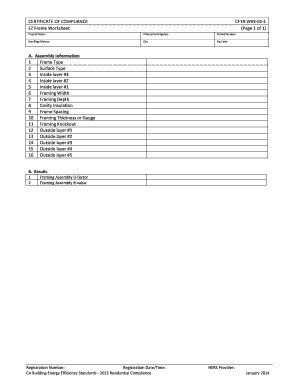
Get Certificate Of Compliance Cf1r-wks-01-e Ez Frame ...
How it works
-

Open form follow the instructions
-

Easily sign the form with your finger
-

Send filled & signed form or save
How to fill out the CERTIFICATE OF COMPLIANCE CF1R-WKS-01-E EZ Frame online
Filling out the Certificate of Compliance CF1R-WKS-01-E EZ Frame online is a straightforward process. This guide provides detailed instructions to assist you in accurately completing each section of the form, ensuring compliance with California's Building Energy Efficiency Standards.
Follow the steps to accurately complete the form online.
- Press the ‘Get Form’ button to acquire the Certificate of Compliance CF1R-WKS-01-E EZ Frame and open it in your preferred online platform.
- Begin by entering the project name in the designated field. Make sure the name reflects the specific project for which this certificate is being filled out.
- Next, provide the enforcement agency's name. This should be the agency responsible for approving compliance in the project area.
- Enter the permit number relevant to your project. This information is typically provided during the permitting process.
- Fill in the dwelling address, including the street number and name, ensuring accuracy for future reference.
- Input the city where the project is located, as well as the corresponding zip code to complete the address details.
- In section A, provide the assembly information starting with frame type. Select the appropriate option from the dropdown list.
- Continue with the surface type by selecting from the dropdown menu. This indicates the partition type separating conditioned and unconditioned spaces.
- For inside layers one, two, and three, select the materials from the materials library that correspond to each layer.
- Enter the framing width and depth for wood framing members in inches. Ensure accuracy to reflect actual dimensions.
- Input the cavity insulation's R-value as required, following the insulation guidelines.
- Fill in the frame spacing, indicating the center-to-center distance between framing members.
- For metal framing, enter the thickness or gauge of the metal framing as applicable.
- Specify the framing knockout percentage based on the standard, typically set at 15%.
- Complete the outside layers by selecting the appropriate material for each layer from the materials library.
- Finally, review the results section. Input the framing assembly U-factor and R-value, ensuring all values are accurate.
- After completing all the sections and verifying the information, save your changes. You may also download, print, or share the completed form as needed.
Now that you have the guide, start filling out your documents online for a smoother compliance process.
Make stunning custom certificates with Adobe Express. Find the perfect certificate template in the Adobe Express online editor, whether it's a Certificate of Recognition, Achievement, Attendance, Diploma, and so much more to start customizing today.
Industry-leading security and compliance
US Legal Forms protects your data by complying with industry-specific security standards.
-
In businnes since 199725+ years providing professional legal documents.
-
Accredited businessGuarantees that a business meets BBB accreditation standards in the US and Canada.
-
Secured by BraintreeValidated Level 1 PCI DSS compliant payment gateway that accepts most major credit and debit card brands from across the globe.