Loading
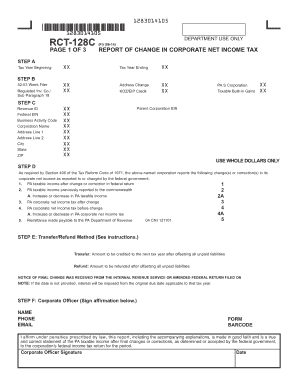
Get Report Of Change In Corporate Net Income Tax (rct-128c). Forms/publications
How it works
-

Open form follow the instructions
-

Easily sign the form with your finger
-

Send filled & signed form or save
How to fill out the Report Of Change In Corporate Net Income Tax (RCT-128C) online
Filling out the Report Of Change In Corporate Net Income Tax (RCT-128C) is essential for corporations to report changes in their corporate net income tax accurately. This guide provides clear, step-by-step instructions to help users complete the form effectively.
Follow the steps to fill out the RCT-128C form correctly.
- Click ‘Get Form’ button to obtain the form and open it in the editor.
- Begin with Step A by entering the tax year beginning and ending dates in the specified MMDDYYYY format. If there is an address change, provide the new address.
- In Step B, indicate if the corporation is a 52-53 week filer, a regulated investment company, claiming KOZ/EIP credit, or shows taxable built-in gains.
- Proceed to Step C, input the Revenue ID, Federal EIN, Business Activity Code, Corporation Name, and complete the address fields including City, State, and ZIP code. Ensure all data is complete and accurate.
- Move to Step D to report the changes or corrections in corporate net income as reported to the federal government. Provide PA taxable income after change, previously reported income, and the respective increases or decreases.
- In Step E, choose your transfer/refund method. Indicate the amounts to be credited or refunded after settling any unpaid liabilities.
- In Step F, include corporate officer details such as name, phone number, and email. The officer must sign and date the report affirming its accuracy.
- After completing the form, review for any errors, ensure all fields are filled accurately, and then save your changes. You can choose to download, print, or share the completed form.
Complete the Report Of Change In Corporate Net Income Tax (RCT-128C) online now.
Calculating net income with a formula Revenue – Cost of Goods Sold – Expenses = Net Income. ... Gross Income – Expenses = Net Income. ... Total Revenues – Total Expenses = Net Income. ... Gross income = $60,000 - $20,000 = $40,000. ... Expenses = $6,000 + $2,000 + $10,000 + $1,000 + $1,000 = $20,000. ... Net income = $40,000 - $20,000 = $20,000.
Industry-leading security and compliance
US Legal Forms protects your data by complying with industry-specific security standards.
-
In businnes since 199725+ years providing professional legal documents.
-
Accredited businessGuarantees that a business meets BBB accreditation standards in the US and Canada.
-
Secured by BraintreeValidated Level 1 PCI DSS compliant payment gateway that accepts most major credit and debit card brands from across the globe.