Loading
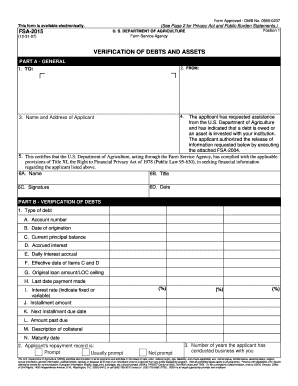
Get Form Fsa 2015 Verifiction Of Debts And Assets
How it works
-

Open form follow the instructions
-

Easily sign the form with your finger
-

Send filled & signed form or save
How to fill out the Form Fsa 2015 Verification Of Debts And Assets online
This guide provides clear instructions on how to complete the Form Fsa 2015 Verification Of Debts And Assets efficiently online. Following these steps will ensure that you accurately fill out the necessary information required by the U.S. Department of Agriculture.
Follow the steps to complete the form online:
- Use the ‘Get Form’ button to obtain the form and open it in your preferred online editor.
- In Part A - General, fill in the 'To' and 'From' sections, providing the names of the relevant institutions and the name and address of the applicant.
- Proceed to Part B - Verification of Debts. Here, you will need to provide detailed information about any debts, including the type of debt, account number, date of origination, current principal balance, accrued interest, and other related fields.
- Within Part B, you will also indicate the applicant's repayment record by selecting one of the three options: Prompt, Usually prompt, or Not prompt, as well as the length of time the applicant has conducted business with the institution.
- Continue to the questions in Part B regarding lien instruments and the possibility of extending additional credit.
- Move to Part C - Verification of Assets. Enter the type of asset, account number, date of origination, balance, interest rate, and additional asset-related information.
- In Part D - Certification, provide the name and title of the institution's representative, their signature, and the date of completion. Additionally, ensure to fill in the telephone number for contact purposes.
- Review all the information entered on the form for accuracy and completeness. Check for any necessary signatures or additional details that may be required.
- Finally, save the changes made to the form. You can then download or print the completed form as needed or share it if directed by the application’s requirements.
Complete your documents online today to ensure a smooth process.
To add a CC BY License to your project, just add the following to your README.md . You should also copy the corresponding license text file and rename it to LICENSE . This work is licensed under a Creative Commons Attribution 4.0 International License.
Industry-leading security and compliance
US Legal Forms protects your data by complying with industry-specific security standards.
-
In businnes since 199725+ years providing professional legal documents.
-
Accredited businessGuarantees that a business meets BBB accreditation standards in the US and Canada.
-
Secured by BraintreeValidated Level 1 PCI DSS compliant payment gateway that accepts most major credit and debit card brands from across the globe.