Loading
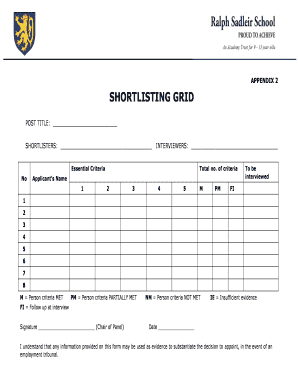
Get Appendix 2 Shortlisting Grid - Ralph Sadleir School - Ralphsadleir Herts Sch
How it works
-

Open form follow the instructions
-

Easily sign the form with your finger
-

Send filled & signed form or save
How to use or fill out the APPENDIX 2 SHORTLISTING GRID - Ralph Sadleir School - Ralphsadleir Herts Sch online
This guide provides a comprehensive overview of the process for filling out the Appendix 2 Shortlisting Grid for Ralph Sadleir School. Follow these instructions to ensure that you accurately complete each section of the form and support a fair shortlisting process.
Follow the steps to efficiently complete the shortlisting grid.
- Press the ‘Get Form’ button to access the form and open it in your chosen document editor.
- Fill in the post title in the designated space to indicate the position for which you are shortlisting applicants.
- Enter the names of the shortlisters in the provided fields. This section should include all members who will be involved in assessing the candidates.
- List the names of the interviewers in the respective section. Ensure that this information accurately reflects those who will conduct the interviews.
- In the 'Essential Criteria' section, number the criteria according to the total number established for this position. Ensure the criteria are clearly aligned with the job requirements.
- For each applicant, write their name in the appropriate space next to the corresponding criteria number.
- Utilize the labels 'M' (person criteria met), 'PM' (person criteria partially met), 'NM' (person criteria not met), 'IE' (insufficient evidence), and 'FI' (follow up at interview) to evaluate each applicant against the essential criteria.
- Complete the signature section, ensuring that the Chair of the Panel signs to affirm the information and decisions documented within the form.
- Enter the date of completion in the designated area to record when the form was finalized.
- Once all sections are complete, review your entries for accuracy before saving any changes. You may also choose to download, print, or share the filled-out form as necessary.
Start completing your documents online to streamline your shortlisting process.
Students are encouraged to demonstrate respect by treating their peers, teachers, staff, and all members of the school community with courtesy, inclusivity, and appreciation for diversity.