Loading
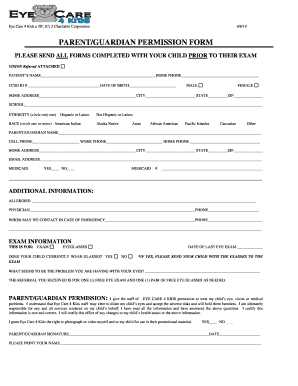
Get Parent/guardian Permission Form
How it works
-

Open form follow the instructions
-

Easily sign the form with your finger
-

Send filled & signed form or save
How to fill out the PARENT/GUARDIAN PERMISSION FORM online
Filling out the Parent/Guardian Permission Form is a vital step in ensuring your child receives proper eye care services. This guide will provide you with clear, step-by-step instructions to complete the form online with ease.
Follow the steps to complete the online form.
- Press the ‘Get Form’ button to access the permission form and open it in your browser.
- Begin by entering your child's name and home phone number. Make sure to provide accurate details as they are essential for identification.
- Fill in your child's CCSD ID number and date of birth. These fields are important for the clinic’s records.
- Indicate your child's gender by selecting either 'Male' or 'Female'.
- Complete the home address section, including city, state, and zip code.
- Provide your child's school information to help with any necessary correspondence.
- Specify your child's ethnicity by circling only one option from the provided list.
- Indicate your child's race by circling one or more options as applicable.
- Enter the name and contact numbers of the parent or guardian completing the form.
- Provide a valid email address for any future communications.
- If applicable, circle 'Yes' or 'No' to indicate whether your child is enrolled in Medicaid and provide the Medicaid number.
- List any allergies your child may have, ensuring to include all relevant information.
- Fill in the name and contact number of your child's physician.
- Provide emergency contact information in case of an urgent situation.
- Select what type of exam is being requested: either for an exam or eyeglasses, and provide the date of the last eye exam.
- Indicate whether your child currently wears glasses. If yes, remind to bring the glasses to the appointment.
- Describe the eye problem you are seeking help for.
- Read and acknowledge the permission section, then select 'Yes' or 'No' regarding the photograph or video usage.
- Sign and date the form, and print your name clearly for record-keeping.
- Once all fields are complete, save the document, download it for your records, print a copy as needed, or share it with the relevant office.
Complete the Parent/Guardian Permission Form online today to ensure your child receives the necessary care.
The purpose of a parent/guardian consent form is: 1. To provide parents/guardians with adequate information about a study so that they may make a fully informed decision regarding whether to: a. consent to their child's participation in the study and/or b.