Loading
Form preview
  • US Legal Forms
  • Other Templates
  • More Forms
  • More Uncategorized Forms
  • Form Rs-2/cd-2 Amendment Filing Form - New York Attorney ... - Ag Ny

Get Form Rs-2/cd-2 Amendment Filing Form - New York Attorney ... - Ag Ny

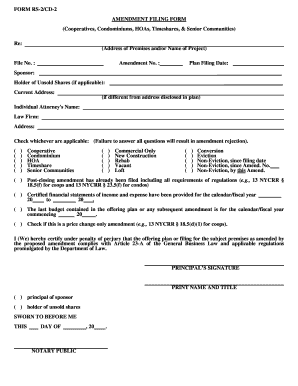
FORM RS-2/CD-2 AMENDMENT FILING FORM (Cooperatives, Condominiums, HOAs, Timeshares, & Senior Communities) Re: (Address of Premises and/or Name of Project) File No. : Amendment No. : Plan Filing.

How it works

  1. Open form

    Open form follow the instructions

  2. Easily sign form

    Easily sign the form with your finger

  3. Share form

    Send filled & signed form or save

How to fill out the FORM RS-2/CD-2 AMENDMENT FILING FORM - New York Attorney online

Filling out the FORM RS-2/CD-2 Amendment Filing Form is essential for cooperatives, condominiums, homeowners associations, timeshares, and senior communities in New York. This guide will provide clear, step-by-step instructions on how to accurately complete the form online, ensuring a successful filing process.

Follow the steps to complete the form accurately.

  1. Click the ‘Get Form’ button to obtain the form and access it in the editor.
  2. Begin by providing the address of the premises or the name of the project in the designated area.
  3. Enter the file number associated with your project in the appropriate field.
  4. Specify the amendment number for the changes you are filing.
  5. Fill in the plan filing date correctly, using the date format suggested in the form.
  6. Complete the sponsor's name and ensure it matches the official documents.
  7. If applicable, provide the holder of unsold shares and their current address, especially if it differs from the address disclosed in the plan.
  8. Enter the individual attorney's name and their law firm in the respective fields.
  9. Check all applicable boxes regarding the type of filing (e.g., cooperative, condominium, timeshare, etc.). Please ensure that all questions are answered to avoid rejection.
  10. Indicate the nature of the project, such as commercial or new construction, by selecting the appropriate checkboxes.
  11. If relevant, clarify the eviction status and whether a post-closing amendment has already been filed.
  12. Certify under penalty of perjury that the offering plan complies with applicable laws by signing at the bottom of the form.
  13. For digital submissions, use the ‘Certify with Digital Signature’ option. For wet ink signatures, sign the form before a notary public.
  14. Review the form for accuracy and completeness.
  15. Finally, save the changes, or download, print, or share the completed form as necessary.

Complete your FORM RS-2/CD-2 Amendment Filing Form online today to ensure compliance and streamline your filing process.

Get form

Experience a faster way to fill out and sign forms on the web. Access the most extensive library of templates available.
Get form

Related content

Forms | New York State Attorney General
Submitters must use the most current forms that are linked to on this page. ... RS-2...
Learn more
NY FOIA Does Not Prevent County From Claiming...
Michael D. Hess, Corporation Counsel of the City of New York, New York, NY (Leonard...
Learn more
List of Internet top-level domains - Wikipedia
This list of Internet top-level domains (TLD) contains top-level domains, which are those...
Learn more

Related links form

Andhra University Application Form For Original Degree Re Entry Action Plan And Return Service Agreement FORM NO. 37EE Henties Bay Municipality

Questions & Answers

Get answers to your most pressing questions about US Legal Forms API.

Contact support

The Conditional Step allows you to conditionally route your workflow to one or more paths based on one or more rules. You can even customize the conditional logic for these rules! To add this step to your workflow, click the "Add Step" button on your Map and then select Add a Conditional from the dropdown menu.

0:30 4:29 How to Create Conditional Questions in Google Forms - YouTube YouTube Start of suggested clip End of suggested clip But it's the best way to make it. Work. Click add section from the menu on the right it'll beMoreBut it's the best way to make it. Work. Click add section from the menu on the right it'll be numbered by default. But it's a good idea to label your sections to help you keep track of them.

Conditional fields allow you to manage sets of dependencies between fields. Such fields are available for editing and display only if the right condition is met. To create conditional fields, you must first create custom fields and then leverage such fields in forms.

Choose Question - first go to menu item "Add-ons" --> Dynamic Fields --> Create Mapping" and select a question where you like to create a mapping to insert values dynamically. Please be aware that only questions of type Drop-down, Multiple Choice, Grid, List and Checkbox are displayed for selection.

Yes, it is possible to create conditional questions natively with Google Forms. However, it is a tiring process, and to create a conditional question in Google Forms, you need to use the "Section" feature. Then you need to use the "Go to section based on answer" option to specify the conditions for each question.

0:34 5:38 Google Forms: Part 2 - Add Branching Questions (aka creating ... - YouTube YouTube Start of suggested clip End of suggested clip And I'm going to call this section Marty's. Place. I'm gonna do the same thing again and I'm gonnaMoreAnd I'm going to call this section Marty's. Place. I'm gonna do the same thing again and I'm gonna create one called cafeteria. And I'm going to come down and create another one called mellow.

Conditional Rules If you would like to prevent your form from being submitted based on a form field, you can use our "conditional submit" feature. This feature will show or hide the submit button based on your set criteria. Clicking Edit will open the Conditional Rules Editor modal.

You can set up a survey so that people only see certain sections based on their answers. Open a form in Google Forms. At the bottom right, click More. Go to section based on answer. If you want the survey to end based on an answer, you can also choose Submit form. Choose specific sections to send people to.

How to create better forms with conditional form fields (CFF) Step 1: Create a form. The first step is simply to create a form that includes all possible fields. ... Step 2: Indicate the field's conditions. ... Step 3: Relate conditional fields to their trigger field.

What Are Conditional Logic Forms? A conditional logic form is a dynamic form that changes based on the user input. For example, a survey form might use conditional logic to show different questions to different users based on their previous answers.

Get This Form Now!

Use professional pre-built templates to fill in and sign documents online faster. Get access to thousands of forms.
Get form
If you believe that this page should be taken down, please follow our DMCA take down processhere.
Get FORM RS-2/CD-2 AMENDMENT FILING FORM - New York Attorney ... - Ag Ny
Get form
  • Adoption
  • Bankruptcy
  • Contractors
  • Divorce
  • Home Sales
  • Employment
  • Identity Theft
  • Incorporation
  • Landlord Tenant
  • Living Trust
  • Name Change
  • Personal Planning
  • Small Business
  • Wills & Estates
  • Packages A-Z
  • Affidavits
  • Bankruptcy
  • Bill of Sale
  • Corporate - LLC
  • Divorce
  • Employment
  • Identity Theft
  • Internet Technology
  • Landlord Tenant
  • Living Wills
  • Name Change
  • Power of Attorney
  • Real Estate
  • Small Estates
  • Wills
  • All Forms
  • Forms A-Z
  • Other Templates
  • Legal Hub
  • About Us
  • Help Portal
  • Legal Resources
  • Blog
  • Affiliates
  • Contact Us
  • Delete My Account
  • Site Map
  • Industries
  • Forms in Spanish
  • Localized Forms
  • State-specific Forms
  • Forms Kit
  • Real Estate Handbook
  • All Guides
  • Notarize
  • Incorporation services
  • For Consumers
  • For Small Business
  • For Attorneys
  • USLegal
  • FormsPass
  • pdfFiller
  • signNow
  • altaFlow
  • DocHub
  • Instapage
Form Packages
  • Adoption
  • Bankruptcy
  • Contractors
  • Divorce
  • Home Sales
  • Employment
  • Identity Theft
  • Incorporation
  • Landlord Tenant
  • Living Trust
  • Name Change
  • Personal Planning
  • Small Business
  • Wills & Estates
  • Packages A-Z
Form Categories
  • Affidavits
  • Bankruptcy
  • Bill of Sale
  • Corporate - LLC
  • Divorce
  • Employment
  • Identity Theft
  • Internet Technology
  • Landlord Tenant
  • Living Wills
  • Name Change
  • Power of Attorney
  • Real Estate
  • Small Estates
  • Wills
  • All Forms
  • Forms A-Z
  • Other Templates
Customer Service
  • Legal Hub
  • About Us
  • Help Portal
  • Legal Resources
  • Blog
  • Affiliates
  • Contact Us
  • Delete My Account
  • Site Map
  • Industries
  • Forms in Spanish
  • Localized Forms
  • State-specific Forms
  • Forms Kit
Legal Guides
  • Real Estate Handbook
  • All Guides
Prepared for you
  • Notarize
  • Incorporation services
Our Customers
  • For Consumers
  • For Small Business
  • For Attorneys
Our Sites
  • USLegal
  • FormsPass
  • pdfFiller
  • signNow
  • altaFlow
  • DocHub
  • Instapage
Social Media
Call us now toll free:
+1 833 426 79 33
As seen in:
© Copyright 1999-2026 airSlate Legal Forms, Inc. 17 Station Street, Ste. 203, Brookline, MA 02445
  • Your Privacy Choices
  • Terms of Service
  • Privacy Notice
  • Content Takedown Policy
  • Bug Bounty Program