Loading
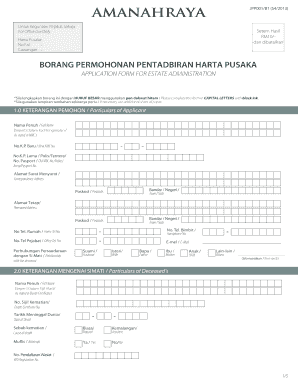
Get Setem Hasil Dibatalkan Form
How it works
-

Open form follow the instructions
-

Easily sign the form with your finger
-

Send filled & signed form or save
How to fill out the Setem Hasil Dibatalkan Form online
This guide provides clear and comprehensive instructions on how to fill out the Setem Hasil Dibatalkan Form online. Whether you are new to estate administration or need assistance, this guide is designed to support you every step of the way.
Follow the steps to successfully complete your form
- Click the ‘Get Form’ button to access the Setem Hasil Dibatalkan Form and open it in your preferred editor.
- Begin by filling out Section 1, 'Particulars of Applicant.' Enter your full name as stated in your identification card, along with your new and old NRIC numbers. Make sure to provide your correspondence address, permanent address, and contact numbers including home, mobile, and office.
- Move to Section 2, 'Particulars of Deceased’s.' Provide the full name of the deceased as noted in the death certificate, along with the death certificate number, date of death, and cause of death.
- In Section 3, 'Particulars of Assets,' detail both immovable and movable assets. For immovable assets, include the type of title, title number, lot number, and location details. For movable assets, list the type of asset, account or registration numbers, along with their estimated values.
- Follow with Section 4, 'Particulars of Deceased's Liabilities.' Document any debts, including the type of liability, creditor's name and address, and estimated value.
- Complete Section 5, 'Particulars of Debtors,' by providing details of any debts owed to the deceased, including types of liabilities and estimated values.
- Fill out Section 6, 'Particulars of Beneficiaries.' List the beneficiaries' names, relationships, NRIC numbers, addresses, and contact information. Ensure to mark if they are listed in the will.
- In Section 7, 'Particulars of Guardian,' fill in details if applicable for minors or incapacitated persons, including the guardian's contact information.
- Review Section 8 regarding the Personal Data Protection Act and provide your consent by signing as needed.
- Proceed to Section 9, 'Declaration.' Complete and sign the declaration section, ensuring all statements are accurate and truthful.
- Finally, check all sections for completeness and accuracy, then save your changes. You may choose to download, print, or share the completed form as needed.
Begin filling out your Setem Hasil Dibatalkan Form online today to ensure smooth estate administration.