Loading
Get Chlfortdcj
How it works
-

Open form follow the instructions
-

Easily sign the form with your finger
-

Send filled & signed form or save
How to fill out the Chlfortdcj online
Filling out the Chlfortdcj application for a concealed handgun license can seem daunting, but this guide will help you navigate each step with ease. This comprehensive guide provides detailed instructions to ensure a smooth online application process.
Follow the steps to complete your application with confidence.
- Click the ‘Get Form’ button to access the application and open it in your browser.
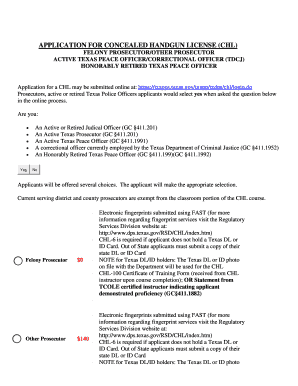
- Indicate your eligibility by selecting 'Yes' if you are an active or retired judicial officer, an active Texas prosecutor, an active Texas peace officer, currently employed by the Texas Department of Criminal Justice as a correctional officer, or an honorably retired Texas peace officer.
- If you are a felony prosecutor, you will see that you are exempt from the $140 application fee. For other prosecutors, make sure to prepare the payment of $140. Active Texas peace officers and honorably retired peace officers will need to submit a fee of $25.
- Ensure you have your electronic fingerprints submitted using the FAST system. For more details on this process, refer to the Regulatory Services Division website.
- If you do not possess a Texas driver’s license or ID card, include a completed CHL-6. Out-of-state applicants must provide a copy of their state driver’s license or ID card.
- Prepare the CHL-100 Certificate of Training Form received from your CHL instructor after course completion, or ensure you have a statement from a TCOLE certified instructor confirming your proficiency.
- After completing all sections, save your application. A receipt and checklist will be generated, which must be saved and submitted via email along with the needed supporting documents.
- At the end of the application process, you will also have the option to schedule an appointment for your fingerprints.
Begin your application for the concealed handgun license online now!
0:37 2:20 HOW TO INSERT A LINE IN WORD FOR RESUME IN 3 ... - YouTube YouTube Start of suggested clip End of suggested clip Process even faster. Same goes for professional. Experience we'll click once and click twice. AndMoreProcess even faster. Same goes for professional. Experience we'll click once and click twice. And then we've got the line there too and this makes sure that the lines.