Loading
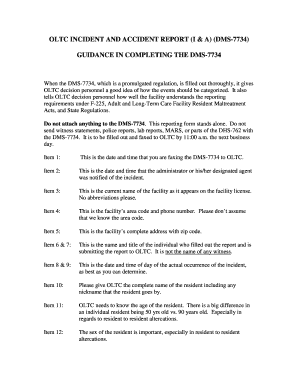
Get Dms 7734
How it works
-

Open form follow the instructions
-

Easily sign the form with your finger
-

Send filled & signed form or save
How to fill out the DMS 7734 online
Filling out the DMS 7734 form is a crucial step in reporting incidents and accidents in long-term care facilities. This guide provides a clear and user-friendly approach to completing the form accurately and thoroughly, ensuring compliance with reporting requirements.
Follow the steps to complete the DMS 7734 effectively
- Click the ‘Get Form’ button to obtain the DMS 7734 form and open it in your online form editor.
- Enter the date and time when you are submitting the form in Item 1.
- Fill in the date and time the administrator or their designated agent was informed of the incident in Item 2.
- Provide the complete name of the facility as it appears on the facility license, without abbreviations, in Item 3.
- Input the facility's area code and phone number in Item 4, ensuring all details are included.
- List the complete address of the facility including the zip code in Item 5.
- Write the name and title of the individual filling out the report in Items 6 and 7, making sure it is not a witness.
- Record the date and time of the incident to the best of your knowledge in Items 8 and 9.
- Provide the full name of the resident, including any nickname they may use, in Item 10.
- Indicate the age of the resident in Item 11 to clarify their age in relation to the incident.
- Specify the sex of the resident in Item 12, as this is important for understanding incident context.
- In Item 13, enter the race of the resident, as it was required at the time the form was created.
- If applicable, check 'Other' in Item 14 and specify what 'Other' refers to in the 'Summary of the Incident' section.
- Select the appropriate type of incident from Item 15 without altering the choices, as this categorizes the report.
- In Item 16, ensure the necessary notifications are documented, particularly to local law enforcement and the administrator.
- Craft a detailed 'Summary of the Incident' in Item 17, explaining what occurred in precise terms, avoiding vague descriptions.
- Describe immediate and future actions taken to protect the resident in Item 18, ensuring clear details on safety measures.
- Review all entries for accuracy and completeness before submitting the form. Once finalized, save changes, and download, print, or share as necessary.
Complete the DMS 7734 form online today for accurate incident reporting.
Biggest Nursing Home Companies in the US Trilogy Health Services. ... National HealthCare Corporation (NYSE:NHC) ... Atria Senior Living. ... Amedisys, Inc. ... The Evangelical Lutheran Good Samaritan Society. ... The Ensign Group, Inc. (NASDAQ:ENSG) ... LHC Group, Inc. (NASDAQ:LHCG) ... Sunrise Senior Living. Number of Employees: 32,500.
Industry-leading security and compliance
US Legal Forms protects your data by complying with industry-specific security standards.
-
In businnes since 199725+ years providing professional legal documents.
-
Accredited businessGuarantees that a business meets BBB accreditation standards in the US and Canada.
-
Secured by BraintreeValidated Level 1 PCI DSS compliant payment gateway that accepts most major credit and debit card brands from across the globe.