Loading
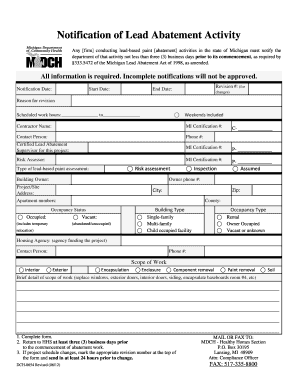
Get Notification Of Lead Abatement Activity - State Of Michigan - Michigan
How it works
-

Open form follow the instructions
-

Easily sign the form with your finger
-

Send filled & signed form or save
How to fill out the Notification Of Lead Abatement Activity - State Of Michigan - Michigan online
The Notification Of Lead Abatement Activity form is a critical document for any firm conducting lead-based paint abatement activities in Michigan. This guide provides clear and concise instructions on how to complete the form online, ensuring compliance with state regulations.
Follow the steps to successfully fill out the Notification Of Lead Abatement Activity form.
- Press the ‘Get Form’ button to download the Notification Of Lead Abatement Activity form and open it in your preferred document editor.
- Enter the 'Notification Date,' indicating the date you are filing the notification.
- Specify the 'Start Date' for the abatement work, ensuring it is at least three business days from the filing date.
- If applicable, enter the 'Revision #' to indicate any changes to a previously filed notification.
- Provide the 'End Date' for the lead abatement activities.
- Choose the reason for revision if the notification has been amended.
- Fill in the 'Scheduled work hours', including starting and ending times, and indicate whether weekends are included.
- Input the 'Contractor Name' along with their Michigan Certification number.
- Enter the contact person's name and phone number for follow-up.
- List the name of the Certified Lead Abatement Supervisor for the project along with their Michigan Certification number.
- Provide the name and Michigan Certification number for the Risk Assessor.
- Select the type of lead-based paint assessment conducted, choosing either 'Inspection', 'Assumed', or 'Risk assessment'.
- Enter the 'Building Owner' name and their phone number.
- Fill in the 'Project/Site Address' along with the corresponding city, county, and zip code.
- Specify any apartment numbers associated with the abatement project.
- Indicate the 'Occupancy Status', marking whether the building is 'Occupied' or 'Vacant'.
- Select the 'Building Type' from the options provided: Single-family, Multi-family, or Child occupied facility.
- Choose the 'Occupancy Type', indicating if it is 'Rental', 'Owner Occupied', or 'Vacant or unknown'.
- If applicable, identify the housing agency funding the project along with a contact person's name and phone number.
- Outline the 'Scope of Work', marking the relevant options such as Interior, Exterior, encapsulation, and any other work planned.
- Provide a brief description of the scope of work, detailing tasks such as replacing windows or encapsulating baseboards.
- After completing the form, save your changes. You may then download, print, or share the form as needed.
Complete the Notification Of Lead Abatement Activity form online to ensure your project complies with state regulations.
Lead abatement helps prevent lead poisoning, also known as plumbism and saturnism, which is a type of metal poisoning caused by lead in the body. Exposure to lead can occur by ingesting contaminated air, water, dust, or food, and by coming in contact with contaminated consumer products.
Industry-leading security and compliance
US Legal Forms protects your data by complying with industry-specific security standards.
-
In businnes since 199725+ years providing professional legal documents.
-
Accredited businessGuarantees that a business meets BBB accreditation standards in the US and Canada.
-
Secured by BraintreeValidated Level 1 PCI DSS compliant payment gateway that accepts most major credit and debit card brands from across the globe.