Loading
Get 74-157 Payee Change Request - Texas Comptroller Of Public ...
How it works
-

Open form follow the instructions
-

Easily sign the form with your finger
-

Send filled & signed form or save
How to fill out the 74-157 Payee Change Request - Texas Comptroller Of Public ... online
The 74-157 Payee Change Request form is essential for individuals and organizations wishing to update their payment information with the Texas Comptroller. This guide provides clear instructions on how to complete the form online efficiently and accurately.
Follow the steps to successfully complete your Payee Change Request online.
- Press the ‘Get Form’ button to access the 74-157 Payee Change Request form and open it for editing.
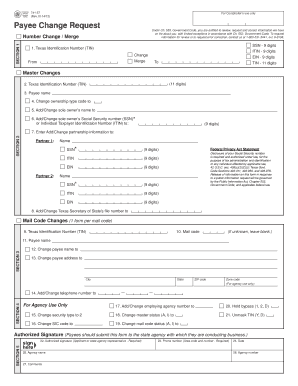
- Begin by indicating the type of change requested in Section 1: select either 'Change' or 'Merge' next to the Texas Identification Number (TIN). Enter the current TIN in the 'From' field and, if applicable, the new number in the 'To' field.
- In Section 2, provide the 11-digit TIN again. Enter the payee name and check the boxes for the changes you wish to request. Complete fields for ownership type code, sole owner's name, and their SSN or ITIN.
- Continue in Section 2 by adding or changing partnership information by entering names and identification numbers for up to two partners.
- In Section 3, provide the new payee name and address, ensuring all address fields follow U.S. Postal Service regulations. End with the payee’s new telephone number.
- Proceed to Section 4, where specific agency use fields must be completed; enter the agency number and select the appropriate status values.
- Finally, complete Section 5 with the authorized signature, phone number, date of signature, agency name, agency number, and any comments that may be necessary.
- Once all sections are filled out correctly, review the form for accuracy before submitting it as necessary to your agency or designated contact.
Complete your 74-157 Payee Change Request online today for efficient processing.
Business and individuals can search for their unclaimed property at ClaimItTexas.gov.
Industry-leading security and compliance
US Legal Forms protects your data by complying with industry-specific security standards.
-
In businnes since 199725+ years providing professional legal documents.
-
Accredited businessGuarantees that a business meets BBB accreditation standards in the US and Canada.
-
Secured by BraintreeValidated Level 1 PCI DSS compliant payment gateway that accepts most major credit and debit card brands from across the globe.