Loading
Get Mvrrs
How it works
-

Open form follow the instructions
-

Easily sign the form with your finger
-

Send filled & signed form or save
How to use or fill out the Mvrrs online
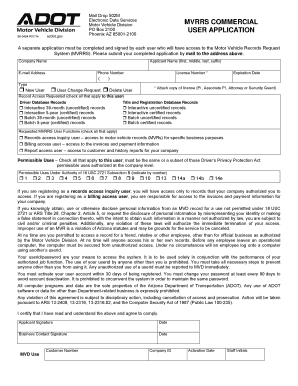
Filling out the Mvrrs can seem daunting, but with this comprehensive guide, you will navigate the process with confidence. This user-friendly guide will provide step-by-step instructions to ensure you accurately complete the application for accessing the Motor Vehicle Records Request System.
Follow the steps to successfully complete the Mvrrs application.
- Press the ‘Get Form’ button to access the Mvrrs application and open it in your preferred editing tool.
- Begin by filling out your company name where indicated. Ensure it is spelled correctly and as registered.
- Next, enter the full name of the applicant, including first, middle, last names, and any suffix if applicable.
- Provide a valid e-mail address. This will be used for communication regarding your application.
- Input a phone number where you can be reached. Make sure it is accurate for any possible follow-up.
- Select the type of application by marking one of the options: 'New User', 'User Change Request', or 'Delete User'.
- Enter the license number and expiration date. A copy of the valid license must be attached.
- Check the appropriate box for record access requested. You can select from options like 'Driver Database Records' or 'Title and Registration Database Records'.
- Indicate any specific record types you want access to, including options for interactive or batch records over specific time frames.
- Select the requested Mvrrs user functions by checking all applicable boxes, such as records access inquiry user, billing access user, or report access user.
- Mark all permissible uses that apply to this user, ensuring they align with those authorized at the company level.
- Read the statements regarding the appropriate use of records and compliance with laws carefully. By signing, you agree to these terms.
- Sign and date the application, first by the applicant and then by the business contact. Ensure that all signatures are clear and legible.
- Once you have filled out the form, save your changes. You have the option to download, print, or share the completed document as needed.
Complete your Mvrrs application online today for smooth processing and access to vital motor vehicle records.