Loading
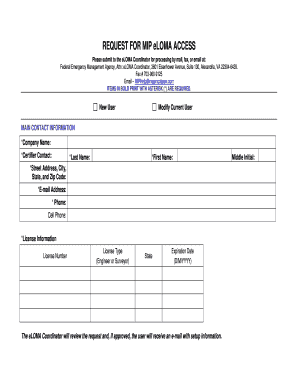
Get Eloma Registration Form Read Onlydoc - Hazards Fema
How it works
-

Open form follow the instructions
-

Easily sign the form with your finger
-

Send filled & signed form or save
How to use or fill out the ELOMA Registration Form Read Onlydoc - Hazards Fema online
Filling out the ELOMA Registration Form is a critical step for users seeking access to the Federal Emergency Management Agency's eLOMA system. This guide provides clear, step-by-step instructions to navigate the form and ensure accurate submission.
Follow the steps to complete the ELOMA Registration Form accurately.
- Press the ‘Get Form’ button to obtain the form and open it in your preferred document viewer.
- Begin with the main contact information. Fill in the required fields marked with asterisks. These include your company name, certifier contact, last name, first name, street address, city, state, zip code, email address, and phone number. Be sure to enter accurate details to avoid processing delays.
- Provide your cell phone number, if applicable. This is optional, but it is useful for the eLOMA Coordinator to reach you if needed.
- Enter your license information. This section requires you to include your license number, license type (engineer or surveyor), state, and expiration date in the format of day/month/year. Ensure that all details match your official documentation.
- If you have a middle initial, complete that section as well. This helps in distinguishing you from others with similar names.
- Review all entries for accuracy. It is crucial to ensure that all information is complete and correctly entered before submission.
- Once you have filled out the form, you can save your changes. Afterward, you may choose to download, print or share the form as needed.
Complete your ELOMA Registration Form online today to gain access to the necessary resources.
Related links form
A Letter of Map Amendment (LOMA) is an official amendment, by letter, to an effective National Flood Insurance Program (NFIP) map.
Industry-leading security and compliance
US Legal Forms protects your data by complying with industry-specific security standards.
-
In businnes since 199725+ years providing professional legal documents.
-
Accredited businessGuarantees that a business meets BBB accreditation standards in the US and Canada.
-
Secured by BraintreeValidated Level 1 PCI DSS compliant payment gateway that accepts most major credit and debit card brands from across the globe.