Loading
Get Vr-334 (07-14) - Mva Maryland
How it works
-

Open form follow the instructions
-

Easily sign the form with your finger
-

Send filled & signed form or save
How to fill out the VR-334 (07-14) - Mva Maryland online
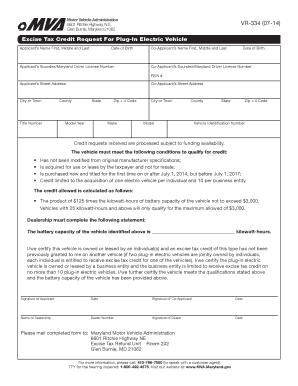
Filling out the VR-334 (07-14) form for an excise tax credit request for a plug-in electric vehicle can seem daunting, but this guide will provide clear, step-by-step instructions to help you complete the process smoothly. Whether you are applying as an individual or a business entity, our guidance is tailored to meet your needs.
Follow the steps to complete the VR-334 form online.
- Click ‘Get Form’ button to access the VR-334 form and open it for editing.
- Enter the applicant’s name, including first, middle, and last names. Ensure correct spelling and capitalization.
- Provide the applicant’s date of birth in the specified format.
- Fill in the co-applicant’s name, also including first, middle, and last names, along with their date of birth.
- Enter the applicant's Soundex or Maryland driver license number, ensuring accuracy.
- Complete the co-applicant's Soundex or Maryland driver license number.
- Provide the FEIN number if applicable.
- Input the applicant's street address, making sure to include all necessary details.
- Fill out the co-applicant’s street address similarly.
- Enter the city or town for both the applicant and the co-applicant.
- Provide the title number of the vehicle.
- Select the county where the applicant resides.
- Indicate the state of residence.
- Enter the model year of the vehicle.
- Fill in the zip code using the +4 format.
- Provide the make of the vehicle.
- Detail the model of the vehicle.
- Re-enter the county of residence.
- Re-enter the state of residence.
- Re-enter the zip code using the +4 format.
- Input the vehicle identification number (VIN).
- Certify that the vehicle meets all qualifications for the credit, ensuring you acknowledge the limitations such as the cap on the maximum credit amount and the requirement for the vehicle to be new and purchased after July 1, 2014.
- Sign and date the form as the applicant.
- Have the co-applicant sign and date the form.
- Specify the name of the dealership and include the dealer number.
- Obtain the signature of the dealership representative and date it.
- Review all entered information for accuracy and completeness.
- Save changes to the document, and opt to download, print, or share it as needed.
Begin your online process to submit the VR-334 form today!
Get form
Experience a faster way to fill out and sign forms on the web. Access the most extensive library of templates available.
Related links form
Get This Form Now!
Use professional pre-built templates to fill in and sign documents online faster. Get access to thousands of forms.