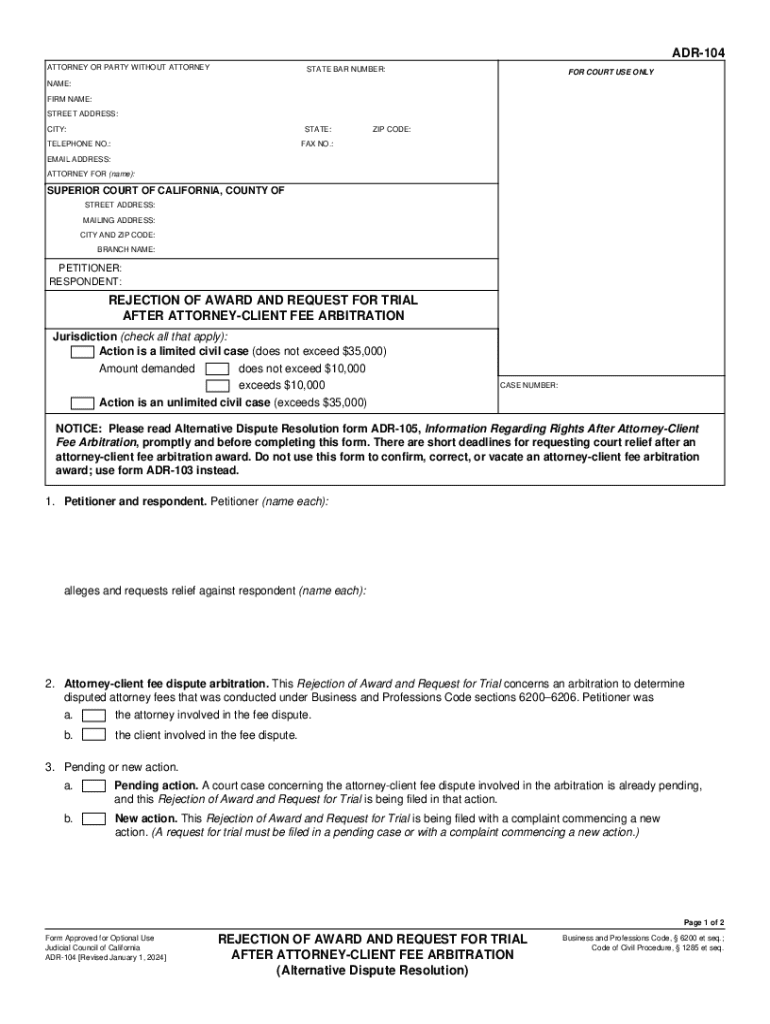
E): SUPERIOR COURT OF CALIFORNIA, COUNTY OF STREET ADDRESS: MAILING ADDRESS: CITY AND ZIP CODE: BRANCH NAME: PETITIONER: RESPONDENT: REJECTION OF AWARD AND REQUEST FOR TRIAL AFTER ATTORNEY-CLIENT FEE ARBITRATION Jurisdiction (check all that apply): Action is a limited civil case (does not exceed $35,000) does not exceed $10,000 Amount demanded exceeds $10,000 Action is an unlimited civil case (exceeds $35,000) CASE NUMBER: NOTICE: Please read Alternative Dispute Resolution form ADR-105, Inf.

Open form follow the instructions

Easily sign the form with your finger

Send filled & signed form or save
How to fill out the CA ADR-104 online
The CA ADR-104 form, titled 'Rejection of Award and Request for Trial After Attorney-Client Fee Arbitration,' is an essential document for individuals seeking to challenge an arbitration award regarding attorney fees. This guide provides a step-by-step approach to successfully completing the form online.
Follow the steps to fill out the CA ADR-104 effectively.
- Click the ‘Get Form’ button to access the CA ADR-104 online and open it in your chosen editor.
- Begin by entering your attorney or party information in the top section. Fill in your name, firm name, street address, city, state, ZIP code, telephone number, fax number, and email address. If applicable, identify the attorney representing you.
- Specify the petitioner and respondent by filling in their names as required. Ensure accurate spelling for clarity.
- Indicate the jurisdiction for the case by checking the appropriate options regarding the civil case limits. Select whether the action is a limited or unlimited civil case and indicate the amount demanded.
- Detail whether this filing pertains to a pending action or a new action by selecting the appropriate checkbox. Provide necessary context about the existing court case if applicable.
- Document the arbitration hearing details, including the date, location, and attendance. Specify if you appeared in person or by counsel, or explain your absence.
- Fill in the arbitration award details, including the date of the award and the amount, specifying whether any party owes the other or if no payment is required.
- Note the timeline for submitting your request, confirming that it is within the stipulated 30 days after the award notice was mailed.
- Acknowledge whether the parties agreed to nonbinding arbitration and confirm your rejection of the award while requesting a court trial.
- Specify the amount in dispute regarding attorney fees and costs, and note the number of pages and attachments included with your submission.
- Finally, review and ensure all sections are completed accurately before saving your changes. Options may include saving, downloading, printing, or sharing the completed form.
Complete your documents online confidently.
Experience a faster way to fill out and sign forms on the web. Access the most extensive library of templates available.
Related content
Jan 1, 2024 — There are short deadlines for requesting court relief after an...
by KM Blankley · 2010 · Cited by 9 — 104 CONN. ... Additionally, California allows any...
by H Areas · 2020 — Standardized case report forms that include information on...
Use professional pre-built templates to fill in and sign documents online faster. Get access to thousands of forms.
If you believe that this page should be taken down, please follow our DMCA take down process here.