Loading
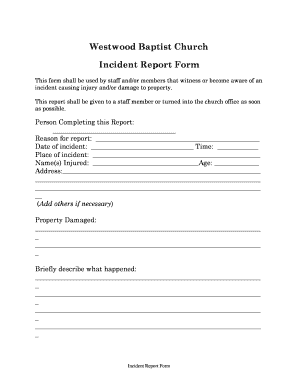
Get Church Incident Report Form
How it works
-

Open form follow the instructions
-

Easily sign the form with your finger
-

Send filled & signed form or save
How to fill out the Church Incident Report Form online
Filling out the Church Incident Report Form online is a crucial step for documenting incidents that may cause injury or damage within the church environment. This guide provides a comprehensive, user-friendly approach to ensure that all necessary information is accurately captured.
Follow the steps to complete the Church Incident Report Form online.
- Click the ‘Get Form’ button to access the Church Incident Report Form and open it for editing.
- Begin by entering your name in the 'Person Completing this Report' field.
- In the 'Reason for report' section, provide a brief statement explaining why this report is being completed.
- Fill in the 'Date of incident' and 'Time' fields with the relevant information regarding when the incident occurred.
- Specify the 'Place of incident' by providing the location where the incident took place.
- List the 'Name(s) Injured' along with their corresponding ages in the designated fields.
- Provide the address of those injured in the 'Address' field.
- Detail any 'Property Damaged' in the respective section, outlining items or areas affected by the incident.
- In the 'Briefly describe what happened' section, give a clear and concise account of the incident.
- Indicate whether an ambulance was called by selecting 'Yes' or 'No' and providing any additional comments in the following field.
- Describe the actions taken at the time of the incident in the section provided.
- Answer whether there were any witnesses and provide their names and contact information as required.
- Indicate if the cause of the incident has been removed by choosing 'Yes', 'No', or 'N/A', and provide an explanation if necessary.
- If there are other follow-up steps you believe should be taken, outline them in the designated section.
- Fill in your signature and the date at the bottom of the form to finalize the report.
- For staff use only: Ensure relevant checks are completed regarding insurance, communication with injured parties, and follow-up investigations as needed.
- Once all fields are filled out, save your changes, and then download or print the form for submission.
Complete your Church Incident Report Form online today to ensure timely documentation and follow-up.
Incident Report Sample Walkthrough: A Step-by-Step Guide Step 1: Provide Fundamental Information. ... Step 2: Take Note of Any Damages and Injuries. ... Step 3: Identify Affected Individual(s) ... Step 4: Identify Witnesses and Take Their Statements. ... Step 5: Take Action. ... Step 6: Close Your Report.