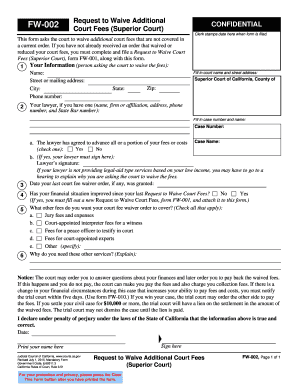
Get This Form Asks The Court To Waive Additional Court Fees That Are Not Covered In - Courts Ca
How it works
-

Open form follow the instructions
-

Easily sign the form with your finger
-

Send filled & signed form or save
Tips on how to fill out, edit and sign This Form Asks The Court To Waive Additional Court Fees That Are Not Covered In - Courts Ca online
How to fill out and sign This Form Asks The Court To Waive Additional Court Fees That Are Not Covered In - Courts Ca online?
Get your online template and fill it in using progressive features. Enjoy smart fillable fields and interactivity.Follow the simple instructions below:
Finding a legal expert, creating a scheduled visit and coming to the workplace for a personal meeting makes finishing a This Form Asks The Court To Waive Additional Court Fees That Are Not Covered In - Courts Ca from beginning to end stressful. US Legal Forms helps you to quickly make legally valid papers according to pre-constructed web-based blanks.
Prepare your docs within a few minutes using our easy step-by-step guide:
- Find the This Form Asks The Court To Waive Additional Court Fees That Are Not Covered In - Courts Ca you require.
- Open it up using the cloud-based editor and begin editing.
- Fill in the blank areas; involved parties names, addresses and numbers etc.
- Customize the template with smart fillable areas.
- Include the day/time and place your electronic signature.
- Click on Done following double-examining everything.
- Save the ready-created record to your device or print it as a hard copy.
Swiftly generate a This Form Asks The Court To Waive Additional Court Fees That Are Not Covered In - Courts Ca without having to involve professionals. We already have more than 3 million users making the most of our rich library of legal documents. Join us today and get access to the top library of web samples. Try it out yourself!
How to edit This Form Asks The Court To Waive Additional Court Fees That Are Not Covered In - Courts Ca: customize forms online
Have your stressless and paper-free way of editing This Form Asks The Court To Waive Additional Court Fees That Are Not Covered In - Courts Ca. Use our trusted online option and save tons of time.
Drafting every document, including This Form Asks The Court To Waive Additional Court Fees That Are Not Covered In - Courts Ca, from scratch requires too much effort, so having a tried-and-true solution of pre-drafted form templates can do magic for your productivity.
But editing them can be challenge, especially when it comes to the documents in PDF format. Luckily, our extensive library has a built-in editor that lets you quickly complete and customize This Form Asks The Court To Waive Additional Court Fees That Are Not Covered In - Courts Ca without the need of leaving our website so that you don't need to waste time completing your documents. Here's what to do with your file using our tools:
- Step 1. Find the required form on our website.
- Step 2. Hit Get Form to open it in the editor.
- Step 3. Take advantage of professional editing features that let you insert, remove, annotate and highlight or blackout text.
- Step 4. Generate and add a legally-binding signature to your file by using the sign option from the top toolbar.
- Step 5. If the form layout doesn’t look the way you need it, use the features on the right to remove, add more, and re-order pages.
- step 6. Add fillable fields so other persons can be invited to complete the form (if applicable).
- Step 7. Pass around or send out the document, print it out, or select the format in which you’d like to get the file.
Whether you need to complete editable This Form Asks The Court To Waive Additional Court Fees That Are Not Covered In - Courts Ca or any other form available in our catalog, you’re on the right track with our online document editor. It's easy and safe and doesn’t require you to have special skills. Our web-based tool is set up to deal with virtually everything you can imagine concerning document editing and completion.
No longer use conventional way of working with your forms. Go with a more efficient option to help you simplify your tasks and make them less reliant on paper.
Your fee waiver application may be denied for 1 of 3 reasons: It is incomplete, or. From your application, the court decided you are not eligible for the fee waiver, or. The court has a substantial question about whether you are eligible for the fee waiver.
Industry-leading security and compliance
-
In businnes since 199725+ years providing professional legal documents.
-
Accredited businessGuarantees that a business meets BBB accreditation standards in the US and Canada.
-
Secured by BraintreeValidated Level 1 PCI DSS compliant payment gateway that accepts most major credit and debit card brands from across the globe.