Loading
Get Form Dmv 48 D Fillable
How it works
-

Open form follow the instructions
-

Easily sign the form with your finger
-

Send filled & signed form or save
How to fill out the Form DMV 48 D Fillable online
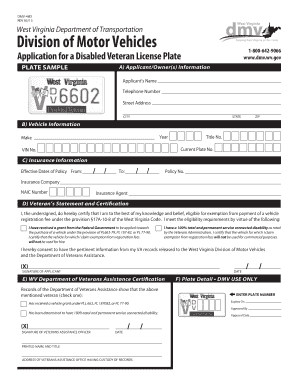
Filling out the Form DMV 48 D is essential for applying for a Disabled Veteran license plate. This guide will help you through each section of the form, ensuring you complete it correctly and efficiently.
Follow the steps to complete the form accurately.
- Press the ‘Get Form’ button to access the form and open it in your preferred editor.
- In section A, provide your personal information: enter your full name, telephone number, street address, city, state, and zip code, ensuring all details are accurate.
- Move to section B to fill in your vehicle information. Input the year, make, title number, current plate number, and VIN number of your vehicle.
- In section C, provide your insurance information. Enter the effective date of your policy, followed by the policy number, insurance company name, NAIC number, and the name of your insurance agent.
- In section D, read the Veteran's statement carefully. Check the applicable box to certify your eligibility and provide your signature and date.
- In section E, ensure that the certification from the West Virginia Department of Veterans Assistance is completed by an authorized officer. They will need to check the appropriate box regarding your disability status.
- Once all sections are complete and reviewed for accuracy, save your changes. You can then download, print, or share the filled-out form as necessary.
Complete your application for the Disabled Veteran license plate online today.
West Virginia 100 Disabled Veteran Benefits Health care benefits. ... Special Monthly Compensation. ... Property Tax Waiver. ... Income Tax Exemption on Retirement Pay. ... Education Assistance (Chapter 35) ... Service-Disabled Veterans Life Insurance Waiver. ... Recreational Benefits.