Loading
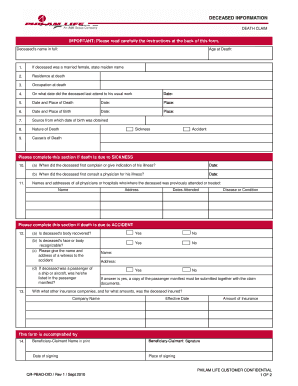
Get Deceased Information Form - Philam Life
How it works
-

Open form follow the instructions
-

Easily sign the form with your finger
-

Send filled & signed form or save
How to fill out the Deceased Information Form - Philam Life online
Completing the Deceased Information Form for Philam Life is an essential step in the claims process following the passing of a loved one. This guide will provide you with clear, step-by-step instructions to assist you in filling out the form accurately and comprehensively online.
Follow the steps to complete your form with ease.
- Click ‘Get Form’ button to obtain the Deceased Information Form and open it for editing.
- Enter the deceased's full name in the appropriate field labeled 'Deceased's name in full'.
- Indicate the age of the deceased at the time of death in the 'Age at Death' section.
- If the deceased was a married female, provide the maiden name as requested.
- Fill in the deceased's residence at the time of death.
- Document the deceased's occupation at the time of death.
- Specify the date the deceased last attended to their usual work in the designated field.
- Complete the section regarding the date and place of death, ensuring all details are accurate.
- Input the date and place of birth of the deceased.
- Indicate the source from which the date of birth was obtained.
- Describe the nature of death succinctly in the designated area.
- List the cause of death, selecting from options such as sickness or accident.
- If the death was due to sickness, provide details on the first complaint and physician consultation dates.
- If the death was due to an accident, answer the questions regarding recovery of the body and recognition, and provide witness information.
- List any other insurance companies the deceased was insured with, along with effective dates and amount of insurance.
- Complete the section for the beneficiary-claimant, including name, signature, date of signing, and place of signing.
- After completing all sections, make sure to save your changes, then download, print, or share the form as needed.
Complete the Deceased Information Form online today to ensure a smooth claims process.
If your account has been disabled, or if you want to check the status of your policy, please call our Customer Hotline at (02) 528-5501 or PLDT Domestic toll free 1-800-188-89100.
Industry-leading security and compliance
US Legal Forms protects your data by complying with industry-specific security standards.
-
In businnes since 199725+ years providing professional legal documents.
-
Accredited businessGuarantees that a business meets BBB accreditation standards in the US and Canada.
-
Secured by BraintreeValidated Level 1 PCI DSS compliant payment gateway that accepts most major credit and debit card brands from across the globe.