We use cookies to improve security, personalize the user experience, enhance our marketing activities (including cooperating with our marketing partners) and for other business use.
Click "here" to read our Cookie Policy. By clicking "Accept" you agree to the use of cookies. Read less
Read more
Accept
Loading
Form preview
  • US Legal Forms
  • Form Library
  • More Forms
  • More Uncategorized Forms
  • Form St-7 Virginia Business Consumer S Use Tax Return ... - Tax Virginia

Get Form St-7 Virginia Business Consumer S Use Tax Return ... - Tax Virginia

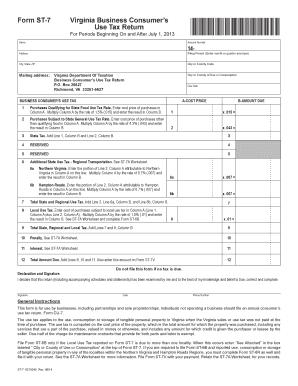
Form ST-7 Virginia Business Consumer s Use Tax Return For Periods Beginning On and After July 1, 2013 *VAST07114888* Name Account Number Address Filing Period (Enter month or quarter and year) City,.

How it works

  1. Open form

    Open form follow the instructions

  2. Easily sign form

    Easily sign the form with your finger

  3. Share form

    Send filled & signed form or save

How to fill out the Form ST-7 Virginia Business Consumer S Use Tax Return online

Filling out the Form ST-7 Virginia Business Consumer S Use Tax Return is crucial for businesses to report their use tax obligations accurately. This guide provides detailed, step-by-step instructions to help you navigate the form with ease.

Follow the steps to complete the Form ST-7 successfully.

  1. Click ‘Get Form’ button to download the form and open it in your document editor.
  2. Enter your name, account number, and address at the top of the form. Provide the filing period, including the month or quarter and year.
  3. Specify the city, state, and ZIP code, and include the city or county code as required for your jurisdiction.
  4. Fill in the city or county of use or consumption along with the due date for the return.
  5. Column A of the form requests the cost price of your purchases. Start by entering the total for purchases that qualify for the reduced state food use tax rate in Line 1.
  6. In Column B of Line 1, multiply the cost price from Column A by 1.5% (.015) to determine the amount due.
  7. Proceed to Line 2 for purchases that are subject to the state general use tax rate. Enter the total cost price in Column A.
  8. In Column B of Line 2, multiply the cost price from Column A by 4.3% (.043) to get the amount due.
  9. For Line 3, sum the amounts in Column B from Lines 1 and 2 to calculate the total state tax due.
  10. If applicable, complete Lines 6a and 6b for additional state use tax related to Northern Virginia and Hampton Roads regions, as instructed.
  11. Continue to Line 8 for local use tax; sum the cost of purchases in Column A and multiply by the local rate of 1.0% (.01).
  12. Add Lines 7 and 8 from Column B for a total state, regional, and local tax in Line 9.
  13. Calculate any penalties and interest if applicable in Lines 10 and 11, then sum these with Line 9 to find the total amount due on Line 12.
  14. Declare and sign the form, including your date and phone number to confirm the accuracy of the return.
  15. Save your changes, download a copy, and print the completed form. Share it or prepare it for mailing as directed.

Complete and submit your Form ST-7 online to ensure compliance with Virginia tax regulations.

Get form

Experience a faster way to fill out and sign forms on the web. Access the most extensive library of templates available.
Get form

Related content

Form ST-7 - Virginia Business Consumer's Use Tax...
Form ST-7 - Virginia Business Consumer's Use Tax Return ... Will the Local Use Tax...
Learn more
What's Virginia's Tax Preference?
Feb 9, 2010 — 7 significant reorganization of Virginia's state budget, changes in ... in...
Learn more
2017 General Instructions for Forms W-2 and W-3...
May 2, 2017 — they may be able to claim an income tax refund because of the EIC. You can...
Learn more

Related links form

IN First Internet Bank Corporate Authorization Resolution TX TAPPS Physical Examination 2014 TX TAPPS Physical Examination 2017 TX TAPPS Physical Examination 2017

Questions & Answers

Get answers to your most pressing questions about US Legal Forms API.

Contact support

If you discover mistakes after you have filed and you need to submit an amended return, you may complete a new tax return through eForms and mark the "amended return" checkbox. See "Amending an eForm" below for more details. Filing an amended eForm does not override or cancel any returns you previously submitted.

Consumer's use tax rates: The use tax rate is the same as your sales tax rate: 7% in Historic Triangle region (City of Williamsburg, and Counties of James City and York) 6% in Northern Virginia, Central Virginia and Hampton Roads regions. 6.3% in Halifax County.

What is Consumer's Use Tax? Use tax is imposed on the storage, use, or consumption of tangible personal property in this state. You must pay consumer's use tax on tangible personal property stored, used, or consumed in Missouri unless you paid sales or use tax to the seller or the property is exempt from tax.

Consumer Use Tax is a tax on the purchaser and is self-assessed by the purchaser on taxable items purchased where the vendor did not collect either a sales or vendor use tax. The purchaser remits this tax directly to the taxing jurisdiction.

The following items must be included when you file your return by paper: Copies of your income statements (W-2s, W2Gs and/or 1099s) if you have an amount on line 14 of your IT 1040 and/or an amount on line 7 of your SD 100.

What items are subject to use tax. Generally, if the item would have been taxable if purchased from a California retailer, it is subject to use tax. For example, purchases of clothing, appliances, toys, books, furniture, or CDs would be subject to use tax.

Business Online Services Account - just log in to your account and select "File/ Pay Taxes" and select the tax type you need to file or pay. Simply fill in the requested fields; there is no need to copy information from one form to the next. View account history and schedule payments in advance up to the due date.

Enclose the original Virginia Forms 760, Schedule ADJ, Schedule OSC, and Schedule CR. ... You are also required to attach all W-2 and 1099 forms, showing Virginia tax withheld with a single staple at the left center of page 1 of the return.

Yes, when you mail a tax return--federal or state--you are supposed to attach a copy of any document showing tax withheld like your W-2 or 1099R.

Business tax bills (choose Business Bill Payments) Balance due on individual return (choose Individual Tax Return Payments) Individual estimated taxes (choose Individual Estimated Tax Payments) Individual bills (choose Individual Bill Payments)

Get This Form Now!

Use professional pre-built templates to fill in and sign documents online faster. Get access to thousands of forms.
Get form
If you believe that this page should be taken down, please follow our DMCA take down processhere.

Industry-leading security and compliance

US Legal Forms protects your data by complying with industry-specific security standards.
  • In businnes since 1997
    25+ years providing professional legal documents.
  • Accredited business
    Guarantees that a business meets BBB accreditation standards in the US and Canada.
  • Secured by Braintree
    Validated Level 1 PCI DSS compliant payment gateway that accepts most major credit and debit card brands from across the globe.
Get Form ST-7 Virginia Business Consumer S Use Tax Return ... - Tax Virginia
Get form
Form Packages
Adoption
Bankruptcy
Contractors
Divorce
Home Sales
Employment
Identity Theft
Incorporation
Landlord Tenant
Living Trust
Name Change
Personal Planning
Small Business
Wills & Estates
Packages A-Z
Form Categories
Affidavits
Bankruptcy
Bill of Sale
Corporate - LLC
Divorce
Employment
Identity Theft
Internet Technology
Landlord Tenant
Living Wills
Name Change
Power of Attorney
Real Estate
Small Estates
Wills
All Forms
Forms A-Z
Form Library
Customer Service
Terms of Service
Privacy Notice
Legal Hub
Content Takedown Policy
Bug Bounty Program
About Us
Help Portal
Legal Resources
Blog
Affiliates
Contact Us
Delete My Account
Site Map
Industries
Forms in Spanish
Localized Forms
State-specific Forms
Forms Kit
Legal Guides
Real Estate Handbook
All Guides
Prepared for You
Notarize
Incorporation services
Our Customers
For Consumers
For Small Business
For Attorneys
Our Sites
US Legal Forms
USLegal
FormsPass
pdfFiller
signNow
airSlate WorkFlow
DocHub
Instapage
Social Media
Call us now toll free:
+1 833 426 79 33
As seen in:
  • USA Today logo picture
  • CBC News logo picture
  • LA Times logo picture
  • The Washington Post logo picture
  • AP logo picture
  • Forbes logo picture
© Copyright 1997-2025
airSlate Legal Forms, Inc.
3720 Flowood Dr, Flowood, Mississippi 39232
Form Packages
Adoption
Bankruptcy
Contractors
Divorce
Home Sales
Employment
Identity Theft
Incorporation
Landlord Tenant
Living Trust
Name Change
Personal Planning
Small Business
Wills & Estates
Packages A-Z
Form Categories
Affidavits
Bankruptcy
Bill of Sale
Corporate - LLC
Divorce
Employment
Identity Theft
Internet Technology
Landlord Tenant
Living Wills
Name Change
Power of Attorney
Real Estate
Small Estates
Wills
All Forms
Forms A-Z
Form Library
Customer Service
Terms of Service
Privacy Notice
Legal Hub
Content Takedown Policy
Bug Bounty Program
About Us
Help Portal
Legal Resources
Blog
Affiliates
Contact Us
Delete My Account
Site Map
Industries
Forms in Spanish
Localized Forms
State-specific Forms
Forms Kit
Legal Guides
Real Estate Handbook
All Guides
Prepared for You
Notarize
Incorporation services
Our Customers
For Consumers
For Small Business
For Attorneys
Our Sites
US Legal Forms
USLegal
FormsPass
pdfFiller
signNow
airSlate WorkFlow
DocHub
Instapage
Social Media
Call us now toll free:
+1 833 426 79 33
As seen in:
  • USA Today logo picture
  • CBC News logo picture
  • LA Times logo picture
  • The Washington Post logo picture
  • AP logo picture
  • Forbes logo picture
© Copyright 1997-2025
airSlate Legal Forms, Inc.
3720 Flowood Dr, Flowood, Mississippi 39232