We use cookies to improve security, personalize the user experience, enhance our marketing activities (including cooperating with our marketing partners) and for other business use.
Click "here" to read our Cookie Policy. By clicking "Accept" you agree to the use of cookies. Read less
Read more
Accept
Loading
Form preview
  • US Legal Forms
  • Form Library
  • More Forms
  • More Uncategorized Forms
  • Aviva Annuity Application Form - Money Advice

Get Aviva Annuity Application Form - Money Advice

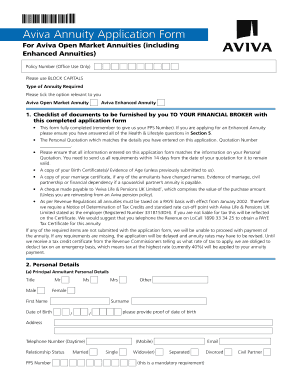
Aviva Annuity Application Form For Aviva Open Market Annuities (including Enhanced Annuities) Policy Number (Office Use Only) Please use BLOCK CAPITALS Type of Annuity Required Please tick the option.

How it works

  1. Open form

    Open form follow the instructions

  2. Easily sign form

    Easily sign the form with your finger

  3. Share form

    Send filled & signed form or save

How to fill out the Aviva Annuity Application Form - Money Advice online

Filling out the Aviva Annuity Application Form - Money Advice online can be straightforward if you follow the right steps. This guide provides a detailed overview of each section of the application form, ensuring users can complete it accurately and efficiently.

Follow the steps to complete your annuity application with ease.

  1. Click the ‘Get Form’ button to download the Aviva Annuity Application Form - Money Advice and open it for editing.
  2. Begin with the 'Checklist of documents' section. Ensure you gather necessary documents such as your Personal Quotation, proof of age, and details of any required marriage certificates.
  3. Proceed to 'Personal Details'. Fill in the information for the Principal Annuitant including title, full name, date of birth, home address, and PPS Number.
  4. If applicable, complete the section for the Spouse or Civil Partner. Provide their title, name, date of birth, and relationship to the Principal Annuitant.
  5. In the 'Purchase Amount' section, indicate the single premium amount and the source of funds, selecting from options such as Personal Pension Plan or Approved Retirement Fund. Make sure to provide corresponding policy numbers if relevant.
  6. Complete the 'Type of Annuity' section by detailing the annuity start date, frequency of payment, guaranteed period, escalation rate, and any provisions for spouse or civil partner’s annuity.
  7. If applying for an Aviva Enhanced Annuity, fill out the 'Health & Lifestyle Questionnaire' with accurate information regarding health status and lifestyle habits.
  8. In the 'Bank Details' section, provide your current account number and bank details for payment processing. Ensure the account can accept Electronic Fund Transfers.
  9. Review and sign the 'Declaration' section. This portion confirms that all information is true and gives consent for information sharing as needed.
  10. Finally, check for completeness and accuracy, save your changes, and download the completed application form for submission to your financial broker.

Complete your Aviva Annuity Application Form - Money Advice online to secure your financial future.

Get form

Experience a faster way to fill out and sign forms on the web. Access the most extensive library of templates available.
Get form

Related content

Aviva Plc Form 20-F - SEC.gov
**This requirement does not apply to the registrant until its fiscal year ending December...
Learn more
Thoresen Review of generic financial advice: final...
advice?”. Put simply, it's guidance on the money matters that shape people's lives:...
Learn more

Related links form

Pakistan Form X Idaho State Police Forensics APPLICATION FOR READMISSION - Oral Roberts University - Oru Microsoft PowerPoint - Beijing Brochure AFSUpdatedpptx

Questions & Answers

Get answers to your most pressing questions about US Legal Forms API.

Contact support

While annuities are designed to provide income during retirement, you don't have to use your pension to buy one. You could use cash from savings, selling other investments, or even releasing equity in your home. Or you could use a combination of these alongside your pension.

If you decide to buy an income for life (an annuity), you can't generally change it or cash it in, even if your personal circumstances change.

You can take money from your pension as and when you need to through income drawdown. It allows you to receive the tax-free part of your pension (usually 25% of your total) as either a single lump sum or in instalments, and to take the taxable part at a later date if you wish.

You're entitled to take up to 25% of your pension pot as a tax-free lump sum. You have the flexibility to take this in one withdrawal, or spread it across multiple withdrawals. With each tax-free withdrawal, three times the amount taken tax-free is moved into a drawdown pot and withdrawals from there will be taxable.

Generally speaking, an investor can only access the funds in their RA from age 55 onwards, with no upper age limit for retirement. When you retire from your retirement annuity, you have the option to withdraw one-third of the investment in cash, with the first R500 000 being tax-free.

You're free to shop around and buy your annuity from any provider – and you might find a better deal by doing that. You might want to consider talking to a regulated financial adviser to help you choose the most suitable annuity.

From age 55 (57 from 6 April 2028 unless you have a protected pension age) you can start using the money you've saved in your pension. One option is to take the money in cash in a way that suits you. There are different ways of doing this, with their own tax implications.

There are rules in place that allow you to cash in your annuity in such circumstances, but only if your provider is willing to let you. There is no obligation for them to accommodate your wishes. If they do, any payment you receive will be subject to income tax.

Get This Form Now!

Use professional pre-built templates to fill in and sign documents online faster. Get access to thousands of forms.
Get form
If you believe that this page should be taken down, please follow our DMCA take down processhere.

Industry-leading security and compliance

US Legal Forms protects your data by complying with industry-specific security standards.
  • In businnes since 1997
    25+ years providing professional legal documents.
  • Accredited business
    Guarantees that a business meets BBB accreditation standards in the US and Canada.
  • Secured by Braintree
    Validated Level 1 PCI DSS compliant payment gateway that accepts most major credit and debit card brands from across the globe.
Get Aviva Annuity Application Form - Money Advice
Get form
Form Packages
Adoption
Bankruptcy
Contractors
Divorce
Home Sales
Employment
Identity Theft
Incorporation
Landlord Tenant
Living Trust
Name Change
Personal Planning
Small Business
Wills & Estates
Packages A-Z
Form Categories
Affidavits
Bankruptcy
Bill of Sale
Corporate - LLC
Divorce
Employment
Identity Theft
Internet Technology
Landlord Tenant
Living Wills
Name Change
Power of Attorney
Real Estate
Small Estates
Wills
All Forms
Forms A-Z
Form Library
Customer Service
Terms of Service
Privacy Notice
Legal Hub
Content Takedown Policy
Bug Bounty Program
About Us
Help Portal
Legal Resources
Blog
Affiliates
Contact Us
Delete My Account
Site Map
Industries
Forms in Spanish
Localized Forms
State-specific Forms
Forms Kit
Legal Guides
Real Estate Handbook
All Guides
Prepared for You
Notarize
Incorporation services
Our Customers
For Consumers
For Small Business
For Attorneys
Our Sites
US Legal Forms
USLegal
FormsPass
pdfFiller
signNow
airSlate WorkFlow
DocHub
Instapage
Social Media
Call us now toll free:
+1 833 426 79 33
As seen in:
  • USA Today logo picture
  • CBC News logo picture
  • LA Times logo picture
  • The Washington Post logo picture
  • AP logo picture
  • Forbes logo picture
© Copyright 1997-2025
airSlate Legal Forms, Inc.
3720 Flowood Dr, Flowood, Mississippi 39232
Form Packages
Adoption
Bankruptcy
Contractors
Divorce
Home Sales
Employment
Identity Theft
Incorporation
Landlord Tenant
Living Trust
Name Change
Personal Planning
Small Business
Wills & Estates
Packages A-Z
Form Categories
Affidavits
Bankruptcy
Bill of Sale
Corporate - LLC
Divorce
Employment
Identity Theft
Internet Technology
Landlord Tenant
Living Wills
Name Change
Power of Attorney
Real Estate
Small Estates
Wills
All Forms
Forms A-Z
Form Library
Customer Service
Terms of Service
Privacy Notice
Legal Hub
Content Takedown Policy
Bug Bounty Program
About Us
Help Portal
Legal Resources
Blog
Affiliates
Contact Us
Delete My Account
Site Map
Industries
Forms in Spanish
Localized Forms
State-specific Forms
Forms Kit
Legal Guides
Real Estate Handbook
All Guides
Prepared for You
Notarize
Incorporation services
Our Customers
For Consumers
For Small Business
For Attorneys
Our Sites
US Legal Forms
USLegal
FormsPass
pdfFiller
signNow
airSlate WorkFlow
DocHub
Instapage
Social Media
Call us now toll free:
+1 833 426 79 33
As seen in:
  • USA Today logo picture
  • CBC News logo picture
  • LA Times logo picture
  • The Washington Post logo picture
  • AP logo picture
  • Forbes logo picture
© Copyright 1997-2025
airSlate Legal Forms, Inc.
3720 Flowood Dr, Flowood, Mississippi 39232