Loading
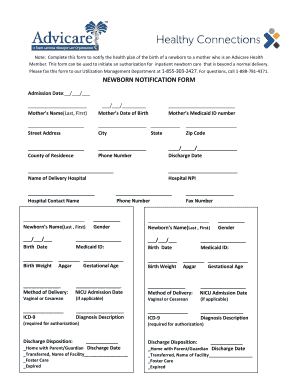
Get Newborn Notification Form - Advicare Health
How it works
-

Open form follow the instructions
-

Easily sign the form with your finger
-

Send filled & signed form or save
How to fill out the NEWBORN NOTIFICATION FORM - Advicare Health online
Completing the Newborn Notification Form for Advicare Health ensures the proper notification of your newborn's birth to the health plan. This guide provides step-by-step instructions for filling out the form online, ensuring a smooth process to secure necessary care for your newborn.
Follow the steps to complete your form with ease.
- Press the ‘Get Form’ button to acquire the form and open it in your chosen document editor.
- Enter the admission date by filling in the fields marked with __/___/___ format.
- Provide the mother’s name in the designated field for last and first name.
- Fill in the mother’s date of birth using the format ___/___/________.
- Complete the street address by writing the full address in the specified field.
- Indicate the city and state where the mother resides.
- Specify the county of residence for the mother in the provided space.
- Enter the mother’s contact phone number in the designated field.
- Fill out the name of the delivery hospital.
- Provide the contact name from the hospital in the appropriate section.
- Enter the newborn’s name in the format Last, First.
- Input the birth date of the newborn in the given format ___/___/___.
- Record the birth weight in the designated field.
- Include the mother’s Medicaid ID number.
- Complete the zip code field for the mother’s address.
- Fill in the discharge date using the format ____/_____/___.
- Provide the hospital NPI number in the specified area.
- Enter the phone number of the hospital.
- Specify the newborn's gender.
- Complete the Medicaid ID field for the newborn.
- Fill in the Apgar score and gestational age for the newborn.
- Indicate the fax number for correspondence.
- Repeat steps 11 to 21 for any additional newborns if applicable.
- Choose the method of delivery and provide the NICU admission date if applicable.
- Complete the diagnosis description sections using the ICD-9 codes.
- Choose the discharge disposition and provide the relevant dates.
- Once all fields are completed, save your changes, and ensure you download, print, or share the completed form as needed.
Start completing your Newborn Notification Form online today!
Industry-leading security and compliance
US Legal Forms protects your data by complying with industry-specific security standards.
-
In businnes since 199725+ years providing professional legal documents.
-
Accredited businessGuarantees that a business meets BBB accreditation standards in the US and Canada.
-
Secured by BraintreeValidated Level 1 PCI DSS compliant payment gateway that accepts most major credit and debit card brands from across the globe.