Loading
Get Form Et 2700 For Equitrust
How it works
-

Open form follow the instructions
-

Easily sign the form with your finger
-

Send filled & signed form or save
How to fill out the Form ET 2700 for Equitrust online
Filling out the Form ET 2700 for Equitrust is a straightforward process when you follow the necessary steps. This guide is designed to assist you in completing the form online with confidence and accuracy.
Follow the steps to complete the Form ET 2700 efficiently.
- Click 'Get Form' button to obtain the form and open it in your preferred online editor.
- In the 'Annuity Contract Numbers' section, list all applicable contract numbers for which you are filing a claim. Remember that you can use one form for multiple policies unless different payment options are selected.
- Complete the 'Information About the Deceased' section by providing the deceased person's name, date of birth, date of death, and their social security number. If applicable, include any other known names and the country where the death occurred.
- Indicate your capacity as a claimant in the 'Beneficiary Information' section. Choose the appropriate box that identifies your role, such as beneficiary, trustee, executor, etc. Make sure to complete any additional forms if required based on your selection.
- In the 'Beneficiary Contact Information' section, enter your contact details as the beneficiary. This includes your name or the name of the estate, date of birth, contact number, address, and relationship to the deceased.
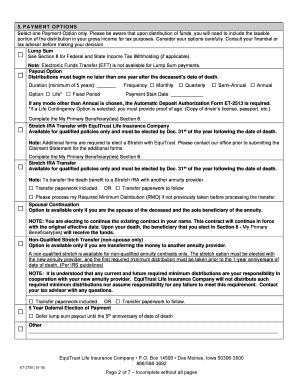
- Select one payment option in the 'Payment Options' section. Be cautious while making this decision, as it will determine how you receive the funds. If you choose a payout option, ensure to complete any additional requirements as specified.
- If applicable, fill out the 'My Beneficiary(ies)' section by providing the information for your primary and contingent beneficiaries. Ensure that the percentage allocation totals 100%.
- Complete any required foreign beneficiary documentation if you or any beneficiaries are not U.S. citizens. Consult the provided guidelines to ensure all necessary forms are included.
- Fill out the tax withholding preferences to indicate if you want federal or state taxes withheld from your distribution. It is vital to review this section carefully to avoid potential tax liabilities.
- Sign and date the form in the 'Certification of Taxpayer Identification Number' section. If signing on behalf of someone else, ensure to indicate your capacity and provide the required documentation.
- Once all sections are completed and verified, save your changes. You may choose to download, print, or share the completed form as needed.
Start filling out your Form ET 2700 online now to ensure timely processing of your claim.
Agent Gateway Please contact us at 866-598-3694 if you are having difficulties. If you already have an established account, click Sign In and enter your current user name and password. Please contact us at 866-598-3694 if you are having difficulties. We need the below information to pull your account.