Loading
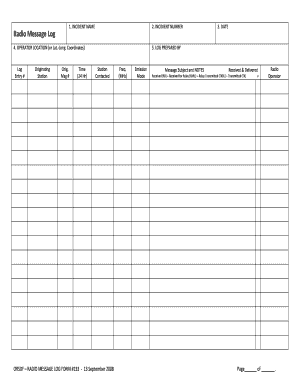
Get Radio Message Log Form #133-2003
How it works
-

Open form follow the instructions
-

Easily sign the form with your finger
-

Send filled & signed form or save
How to fill out the RADIO MESSAGE LOG FORM #133-2003 online
The RADIO MESSAGE LOG FORM #133-2003 is essential for documenting radio communication incidents effectively. This guide will provide you with clear, step-by-step instructions to help you fill out the form online efficiently and accurately.
Follow the steps to complete your form with ease.
- Click ‘Get Form’ button to obtain the form and open it in the editor.
- Begin with the first section labeled 'Incident Name.' Enter a descriptive title for the incident that clearly identifies the situation being reported.
- Proceed to the 'Date' field. Ensure you input the date of the incident in the correct format, such as MM/DD/YYYY.
- In the 'Operator Location' section, provide either the geographical location or the latitude and longitude coordinates of the operator during the communication.
- Complete the 'Log Entry #.' This number should be sequential, indicating the order of entries for a particular incident.
- Fill out the 'Originating Station' and 'Orig. Msg #' fields. Enter the name of the station that initiated the communication and the number assigned to the original message.
- Input the 'Time' in 24-hour format to indicate when the communication occurred.
- In the 'Log Prepared By' section, specify the name of the person completing this log.
- Next, complete the 'Station Contacted' and relevant frequency (MHz) and emission mode fields. This information details the technical aspects of the communication.
- Finally, summarize the 'Message Subject and Notes' section with a brief overview of the message content and any additional notes or details.
- In the last part, indicate the status of the message, selecting from the options: Received, Received for Relay, Relay Transmitted, or Transmitted.
- Once all fields are filled out correctly, you can save your changes, download the completed form, print it out, or share it as needed.
Take the next step and complete your RADIO MESSAGE LOG FORM #133-2003 online today!
Log – The written record of what transpires at the radio station, including: music, commercial content and transmitting specifications.