Loading
Get 96 001-e
How it works
-

Open form follow the instructions
-

Easily sign the form with your finger
-

Send filled & signed form or save
How to fill out the 96 001-E online
Filling out the 96 001-E form is essential for obtaining an electrical permit in the Philippines. This guide will provide you with step-by-step instructions to ensure you complete the form correctly and efficiently.
Follow the steps to accurately complete the 96 001-E form online.
- Click ‘Get Form’ button to obtain the form, which will open in your preferred online editor.
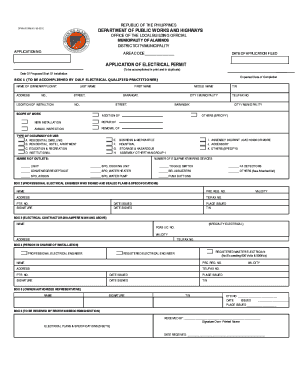
- Begin by entering the application number in the designated field. This is important for tracking your application status.
- Fill in the area code and the date of application filed. Ensure that these details are accurate.
- Indicate the date of proposed start of installation and the expected date of completion in the corresponding fields.
- In Box 1, input the name of the owner or applicant along with their address details, including last name, first name, middle name, street address, barangay, city, and municipality.
- Select the scope of work from the provided options: repair, annual inspection, removal, addition, new installation, etc. Clearly specify the type of occupancy or use as applicable.
- Complete the section on the number of equipment/wiring devices being installed. List all relevant devices such as lights, outlets, and switches.
- In Box 2, if applicable, enter the professional electrical engineer's details, including their name, PRC registration number, address, and contact information.
- If an electrical contractor is involved, fill in their details in Box 3, including name, PCAB license number, and contact information.
- In Box 4, input the details of the person in charge of the installation, whether a professional electrical engineer or a registered master electrician.
- In Box 5, the owner or authorized representative must provide their name, signature, and TIN, as well as the date issued and place issued.
- In Box 6, ensure that the form is received by the appropriate receiving/recording section, including the person’s name who received the documents and the date received.
- Once all sections are completed, save your changes. You can then download, print, or share the completed form as needed.
Begin your document submission process by completing the 96 001-E form online today.
1. Applicant. 2. Professional Electrical Engineer who signed and sealed electrical plans and specifications, with a photocopy of a valid Professional Tax Receipt (PTR) and valid Professional Regulation Commission (PRC) License.