Loading
Form preview
  • US Legal Forms
  • Form Library
  • More Forms
  • More Uncategorized Forms
  • Sce W8

Get Sce W8

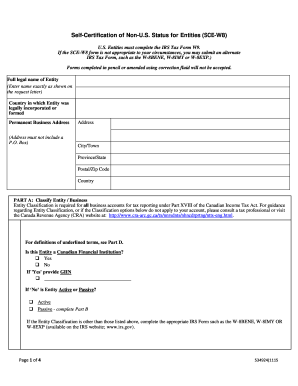
Tax Form, such as the W-8BENE, W-8IMY or W-8EXP.) Full legal name of Entity Country of Incorporation / Country of Formation Permanent Business Address Address (Address must not include a P.O. Box) City / Town Province / State Postal Code Country PART A: Select Entity Classification Entity Classification is required for tax reporting under Part XVIII of the Income Tax Act. For guidance regarding document completion, or if the Classification options below do not apply to your account, please.

How it works

  1. Open form

    Open form follow the instructions

  2. Easily sign form

    Easily sign the form with your finger

  3. Share form

    Send filled & signed form or save

How to fill out the Sce W8 online

Filling out the Sce W8 form online can seem challenging, but with the right guidance, you can complete it efficiently. This guide provides a clear step-by-step process tailored for users, regardless of their legal experience, ensuring you understand each component of the form.

Follow the steps to complete the Sce W8 online accurately.

  1. Click ‘Get Form’ button to obtain the form and open it in an online editor.
  2. Enter the full legal name of the entity in the designated field.
  3. Fill in the country of incorporation or formation. Make sure this accurately reflects where the entity is established.
  4. Provide the permanent business address. Note that this address must not include a P.O. Box.
  5. Complete the city or town, province or state, postal code, and country fields as requested.
  6. In Part A, select the appropriate entity classification by choosing the relevant option that best describes your entity's status.
  7. For Passive NFFEs, if applicable, complete Part B by identifying any U.S. persons who own or control the entity. Include their names, addresses, and taxpayer identification numbers as requested.
  8. Once all required sections are completed, review the information to ensure accuracy.
  9. Finally, navigate to Part C to certify the information. Enter your full name, title, sign the form, and include the date.
  10. Save your changes, then download, print, or share the completed Sce W8 form as needed.

Start completing your Sce W8 form online today to ensure compliance.

Get form

Experience a faster way to fill out and sign forms on the web. Access the most extensive library of templates available.
Get form

Related content

The delayed genotoxic effect of N-nitroso...
In CHO-W8 cells, pulsed-treatment of the insecticide in the 1st replication cycle showed...
Learn more
SCE Design and Engineering Services
This report was prepared by Southern California Edison (SCE) and funded by ... Constant...
Learn more
In Instructions Instructions - PartSelect
pour sce[[er les joints. 3. Une fois la s_cheuse clans son emplacement d_finitif, ... REM...
Learn more

Related links form

American First Finance Login CMHS NOMs Child Client-level Measures For Discretionary Programs Providing Direct Services Child Or Disability Income Benefits - Long Term Disability Employer Statement Request For Information: () - Great West Life

Questions & Answers

Get answers to your most pressing questions about US Legal Forms API.

Contact support

(Active NFE) An Active NFE generally refers to an entity that operates an active trade or business with <50% passive income (gross) or have <50% assets that produce passive income*. * Passive income includes dividends and interest.

The term “passive income” means the portion of gross income that consists of¹: (1) Dividends, including substitute dividend amounts; [section 1.1472- 1(c)(1) (iv)(A)(1)] (2) Interest; [section 1.1472-1(c)(1)(iv)(A)(2)] (3) Income equivalent to interest, including substitute interest and amounts received from or.

Foreign Financial Institution (FFI). A foreign financial institution (FFI) generally means a foreign entity that is a financial institution.

FATCA requires foreign financial institutions (FFIs) to report to the IRS information about financial accounts held by U.S. taxpayers, or by foreign entities in which U.S. taxpayers hold a substantial ownership interest.

A foreign financial institution (FFI) means a foreign entity that is a financial institution.

A Passive NFFE A Passive NFFE is any NFFE that is not: (i) an Active NFFE or (ii) a Withholding Foreign Partnership, Withholding Foreign Trust, or a Qualified Intermediary pursuant to relevant US Treasury Regulations.

An NFFE is either an active NFFE or a passive NFFE. An organisation is a passive NFE if it is not an active NFE or a type of investment entity. Organisations that are passive NFEs are required to complete self-certifications both for themselves and for each controlling person.

Examples of passive non-financial entities are family trusts, investment clubs, non-profit entities that are registered not for gain, and entities that own a farm and its only income is rental income, not farming income.

Get This Form Now!

Use professional pre-built templates to fill in and sign documents online faster. Get access to thousands of forms.
Get form
If you believe that this page should be taken down, please follow our DMCA take down processhere.

Industry-leading security and compliance

US Legal Forms protects your data by complying with industry-specific security standards.
  • In businnes since 1997
    25+ years providing professional legal documents.
  • Accredited business
    Guarantees that a business meets BBB accreditation standards in the US and Canada.
  • Secured by Braintree
    Validated Level 1 PCI DSS compliant payment gateway that accepts most major credit and debit card brands from across the globe.
Get Sce W8
Get form
  • Adoption
  • Bankruptcy
  • Contractors
  • Divorce
  • Home Sales
  • Employment
  • Identity Theft
  • Incorporation
  • Landlord Tenant
  • Living Trust
  • Name Change
  • Personal Planning
  • Small Business
  • Wills & Estates
  • Packages A-Z
  • Affidavits
  • Bankruptcy
  • Bill of Sale
  • Corporate - LLC
  • Divorce
  • Employment
  • Identity Theft
  • Internet Technology
  • Landlord Tenant
  • Living Wills
  • Name Change
  • Power of Attorney
  • Real Estate
  • Small Estates
  • Wills
  • All Forms
  • Forms A-Z
  • Form Library
  • Legal Hub
  • About Us
  • Help Portal
  • Legal Resources
  • Blog
  • Affiliates
  • Contact Us
  • Delete My Account
  • Site Map
  • Industries
  • Forms in Spanish
  • Localized Forms
  • State-specific Forms
  • Forms Kit
  • Real Estate Handbook
  • All Guides
  • Notarize
  • Incorporation services
  • For Consumers
  • For Small Business
  • For Attorneys
  • USLegal
  • FormsPass
  • pdfFiller
  • signNow
  • altaFlow
  • DocHub
  • Instapage
Form Packages
  • Adoption
  • Bankruptcy
  • Contractors
  • Divorce
  • Home Sales
  • Employment
  • Identity Theft
  • Incorporation
  • Landlord Tenant
  • Living Trust
  • Name Change
  • Personal Planning
  • Small Business
  • Wills & Estates
  • Packages A-Z
Form Categories
  • Affidavits
  • Bankruptcy
  • Bill of Sale
  • Corporate - LLC
  • Divorce
  • Employment
  • Identity Theft
  • Internet Technology
  • Landlord Tenant
  • Living Wills
  • Name Change
  • Power of Attorney
  • Real Estate
  • Small Estates
  • Wills
  • All Forms
  • Forms A-Z
  • Form Library
Customer Service
  • Legal Hub
  • About Us
  • Help Portal
  • Legal Resources
  • Blog
  • Affiliates
  • Contact Us
  • Delete My Account
  • Site Map
  • Industries
  • Forms in Spanish
  • Localized Forms
  • State-specific Forms
  • Forms Kit
Legal Guides
  • Real Estate Handbook
  • All Guides
Prepared for you
  • Notarize
  • Incorporation services
Our Customers
  • For Consumers
  • For Small Business
  • For Attorneys
Our Sites
  • USLegal
  • FormsPass
  • pdfFiller
  • signNow
  • altaFlow
  • DocHub
  • Instapage
Social Media
Call us now toll free:
+1 833 426 79 33
As seen in:
© Copyright 1999-2026 airSlate Legal Forms, Inc. 3720 Flowood Dr, Flowood, Mississippi 39232
  • Your Privacy Choices
  • Terms of Service
  • Privacy Notice
  • Content Takedown Policy
  • Bug Bounty Program